
1 year ago

You may have noticed that I record videos with Aero off, and I have a pretty good reason for that.


When I open OBS Studio with Aero on, it sets my FPS down to 20, even if the FPS value is at 60. There's an option in OBS Studio that disables Aero which fixes the low FPS issue if you are running Windows 7.
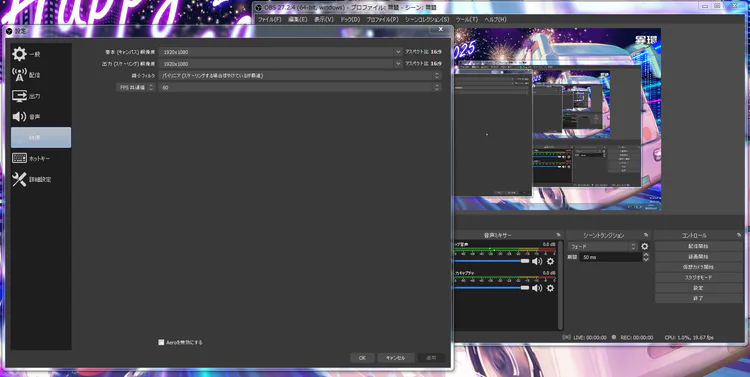
image.png

Here's another screenshot after I disabled Aero, now the FPS is at 60!
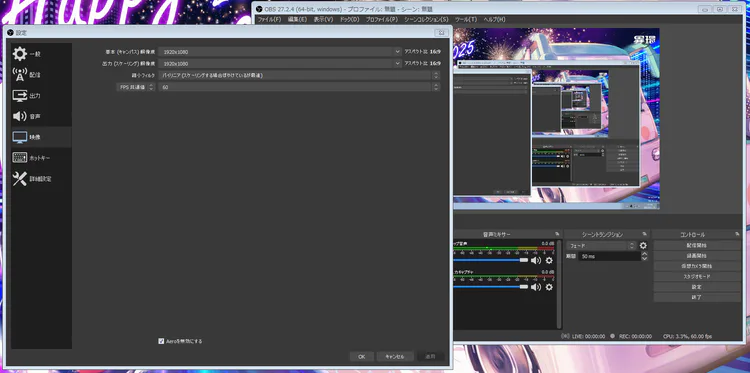
image.png


0 comments

Loading...

Next up

Thank you for 25k likes!

Laptop looks very nice

The audacity for YouTube to say this while deleting a ton of YouTube channels for no real reason is actually insane.

This tornado is huge ;-;

Apparently Minecraft has a new version number, interesting...

2 Misono Mikas

Managed to beat Five Nights at Wario's: Origins all max mode, with the battery in cabinet turned OFF, this was really difficult lol

Merry Christmas everyone!

Ice cream :)

Nope, not playing that Roblox game, plus I don't see the appeal to it.