
First off let me say this is not intended to be an advert for construct 2, i am simply showing you a different way of coding that allow for rapid prototyping.
Firstly, what is construct 2? In Scirras words; (creators of construct 2)
“Construct 2 is a powerful ground breaking HTML5 game creator designed specifically for 2D games. It allows anyone to build games — no coding required!”
i would say that this is a fairly accurate discription now just to point out although it is html5 based you can export to tons of formats exe you can export to cocconjs for android development chrome webstore and what i also like is the it has a massive community of plugin makers along with people who make behaviors and effects. construct 2 comes in 3 forms free edition, personal edition and business edition
Free edition
in the free edition there are only a few limitations, the main being is you only get 100 lines of code now this may seem small but later on ill show how you can bypass a lot of the stuff you normal use code for, another limitation is you only get 4 layers but to this day i have never used more than 4 anyway 1 for a UI layer one for the game objects and 2 for background (paralax scrolling) the other limitations include some exports are removed no commercial use and so on (for full list go here https://www.scirra.com/store/construct-2)
Personal License £80
The only limitation is the amount of money you can make, with the personal license you can earn up to $5000
Business License £260 (personal to business upgrade available)
No limit to amount you can make and email support prioritisiation
Anyway to start of this is what a typical event sheet in construct looks like
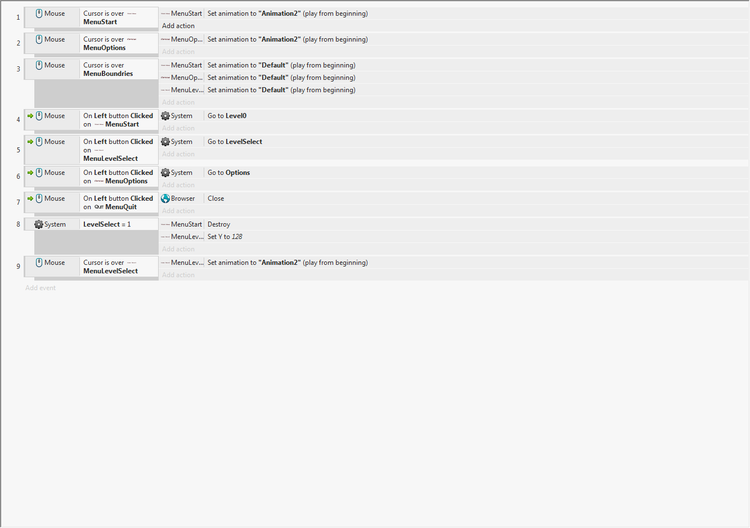
You may notice that this very simplistic, as i said before this is an excellent protyper simply because you can make what you want very quicklly
so lets have a look exactly what this does when you hover over the “MenuSart” object it sets the animation to “Animation2” this is a basic rollover effect if i had a single rollever object i could add the sub effect “else” to change it back to the default when its not over it but i prefer to create a seperate object to add as a boundry hence the “MenuBoundries” event as you can see there is a browser close event this is because i have the browser object this works with both browser based games and desktop when you have it in desktop it basicly runs the game in what is essentially a browser but you don’t notice that it is as it simply show the layout your on so dont get scared or confused by that ok as you can see there the “LevelSelect = 1” this is a global variable normally it would should it at the top but the variable only shows in the event sheet if the layout it is tied to has a trigger to change it anyway when the variable = 1 they menustart object is destroyed and the menulevelselect object’s y value is changed to 128 this because i have the menulevelselect object is set in the margins it just saves me having to create the object which may cause lag on very low end computers instead it is loaded when the layout is loaded
now lets go a bit more advance
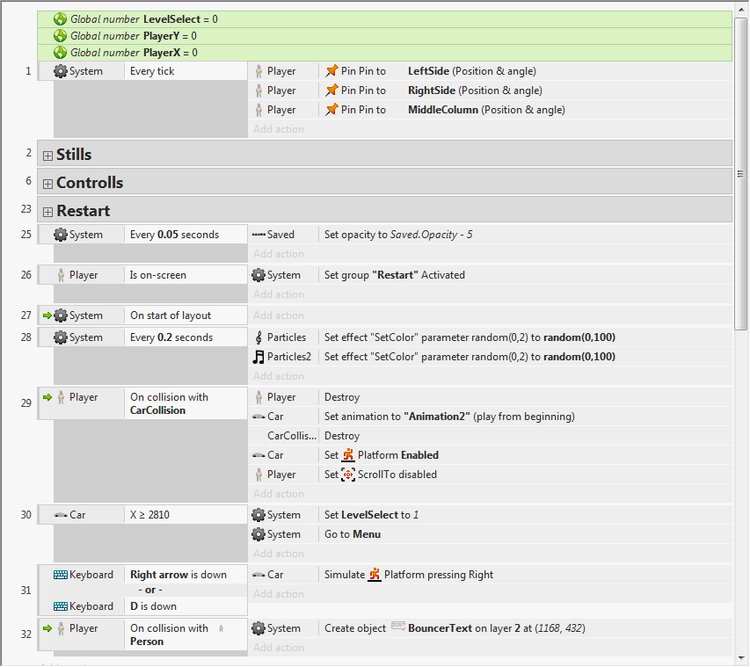
Ok as you can see at the top there are 3 variables “LevelSelect” “PlayerX” and “PlayerY” if you remember there was a trigger in the menu event sheet (previous pic) for the level select object to appear when “LevelSelect” = 1 and here levelselect is set 1 when the “car” object has an x value equal or great than 2810 this is nothing to do with the PlayerX or PlayerY. ok now on to the player coords for this i need another pic
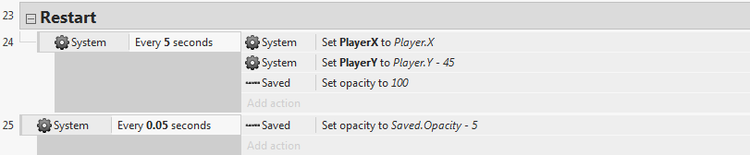
initiall i have set playx and playery to 0 every 5 seconds it sets the playerx variable to the the x coords and the same for the y value and also when this is set the “saved” text’s opacity is set 100 and then every 0.05 second it is decreases by 5 to make a fade out effect
Free edition bypasses
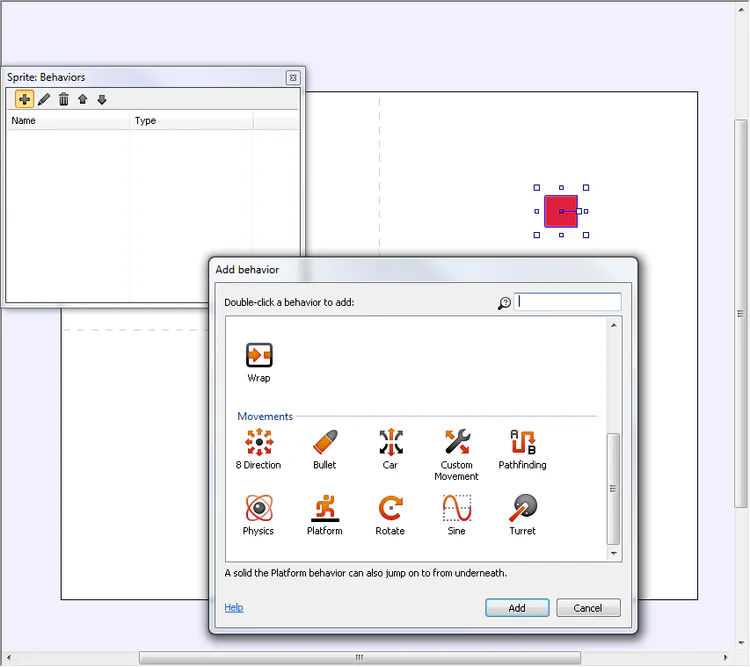
Here i have made a simple red square and have opened the behavior menu here i can add different behaviors (obviously) these are very useful for not having to code anything for example the platform behavior add default movement left and right and a jump there is also an option to mirror the sprite for left or right so you dont need to make a seperate animation it just flips this also save up some of those precious 100 lines of code now if you make a seperate object and add the solid behavior you can make a simple jumping platformer without any code or if you have multiple levels one line of code per layout by the way the 100 code limit is for each event sheet and each layout has their own event sheet and that code would be x=or> “end of level” go to layout “layoutname” done if you want music you can add the music object and have one line of code saying on start of layout play “trackname” looping at userdefined” decibels
Just mess around with it is fun to use and youll be amazed also there is a thriving plugin community creating more usefull behaviors such as the moveto which is an advance pathfinding plugin which is much better than the default one where you have to have a code for finding a path and moving along the path and then deleting it you just have one code for object moveto object 2 and you can set what objects to avoid in the behavior settings just have a look at the plugin section of the forum if you want to expand a bit















0 comments