Game
Learn Functional Programming
6 years ago

https://www.youtube.com/watch?v=i3K4i9n1dzg

Article: Keeping LFP Stable with Unit Testing


YouTube
https://www.youtube.com/watch?v=i3K4i9n1dzg
youtube.com

Sometimes the logic in LFP gets a little complicated. Updating one part of the code could break another part of the code.

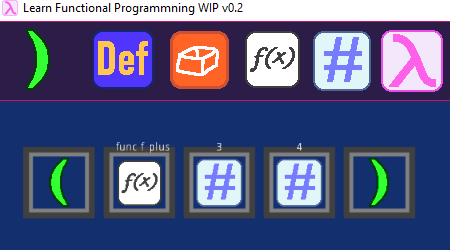
For example, when I added tokens that can’t be edited by the player, I had to make it so those tokens couldn’t be deleted by the player.
unit_testing_delete_before.png

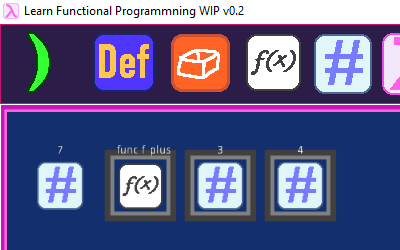
However, this made it so when you pressed “Evaluate”, which deletes any tokens it evaluates so it can show the result, any uneditable tokens wouldn’t be deleted and the game would get very confused.
unit_testing_delete_after_wrong.png

To make sure new changes don’t break old features, it’s a good idea to retest everything every time you make a change. This is called regression testing.

Normally, this is really annoying to do, but it's very easy with Unit Testing. A unit test has three basic steps:

1) check the current state

2) run some function or feature

3) check the state again to make sure what you expected to happen actually happened

In the example above, I had a unit test that compares how many tokens there are before and after you delete a token. If something went wrong with deleting the token, the automated test can report that the number of tokens isn’t matching what it expects.

This means whenever you add a feature, you’re actually adding both a feature and a test for that feature.

This might sound like a pain, but once you write the test once, you can retest it as many times as you need. Every time you add one feature and one test for that feature, you can then run every test for every feature in your game. If every test passes, you can be confident your new feature didn’t break anything.

If you’re using Godot. I highly recommend Gut for unit tests. This tutorial shows you how to set it up. It's made working on LFP a lot easier for me!



0 comments

Loading...

Next up

This Satuday we invite to watch another #speedpainting of our artist Daniel Faiad.

How great is this scene of #Pecaminosa?

#ScreenShotSaturday | #IndieDev | #DigitalArt

Did you know that today is #InternationalJazzDay? 🎷😎

No? 😯 Well, we couldn't pass up this date!

And what better to celebrate this day than #Pecaminosa #OST? 🎷

Let us know what you think about it and have a great weekend!

In the quest for accessibility, I'm adding Resurrection Shrines for players on the 'novice' end of the platforming spectrum.

In order to unlock the power of a Shrine, you must collect 3 'Souls' from your dead corpses! (the floating blue orbs)

Hi everyone! I started to create some environment props for my new video game, here is a cozy house in the forest. I'm planning to switch from Unity to Unreal... Let's see what new challenges I have to face. Made in Blender and Substance Painter.

Call it 'wrong turn'!🚫 The feeling of running into a house with only one exit🚪, and being doomed to die. #pixelart #pixelartist #pixelartwork #art #pixel #indiegame #IndieGameDev #indieartist

"Day to Day" (also check spud out here he's a great guy and writer: https://soundcloud.com/spudward)

Hi all, Quick update with a bunch of fixes and changes.

Updated save system, optimisation and screen tear fixes, a new shoutout room and more sounds.

Don't forget to follow the kickstarter going live on the 20th! https://www.kickstarter.com/projects/9fingergames/zapling-bygone

Enjoy!

Sonic The Hedgehog style Super Smash Bros 4 Pixel art Gif.

Hey you, rookie! Yes, I am talking to you!! Come over here? Relax! Just stick to me and everything will be fine. By the way, my name is James Varhuher, but you can call me Big J. I will bring you up to speed.

Ladies & gentlemen.. The Blender logo factory! I had a ton of un making this animation. I'll be making a short tutorial on picking up/dropping object in Blender for animations next week! What do you think?