
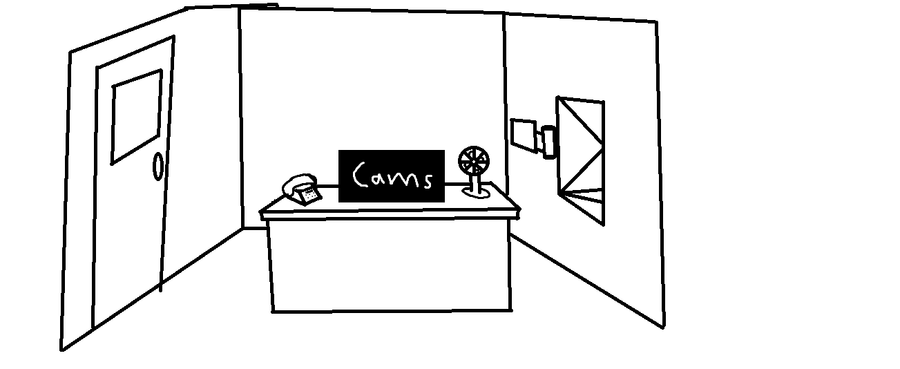
Left-Normal door, when you move to the left(Either click a key/ button or move your mouse to the left, undecided), you have to shine a light through the window, if an animatronic is present, you must lock the door.
The door will unlock if you look away from it(you have to hold the lock, down due to a jam or something idk)
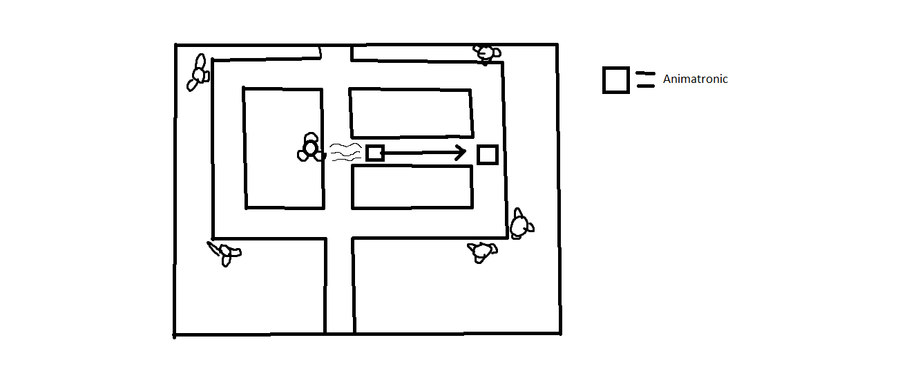
Right-A vent, by turning right an option to bring up a panel shows up, this panel isn't like and normal fnaf panel (doesn't work by closing off vents or using an audio lure) when you bring up the panel there will be buttons that look like fans when you click it, the fan will blow, back any animatronic that's in front of it in a STRAIGHT LINE which will take away some power but you shouldn't need to use it often. Fans that you just recently used have a maybe 15-20 second cooldown. Also to find animatronics you have to use a motion detector first. Motion detector works across the entire vent system. ALSO if vent animatronics get past the fans and stuff into the vent that goes to your office then you're just screwed
I'll post another image to get a better understanding of it.
Power system- Only three things take up power Fans, Camera system, and lights. If power depletes then you won't be able to use the cameras lights(if you bring them up it will just say camera lights dead) and the lights to check-in vents and check the door
Cameras- Only gimick is that you can toggle lights, thats it

















0 comments