
So I got bored and decided to help out some one who was trying to spawn objects randomly.
I had not recently used java and never used slick2d or LWJGL or so to get up to speed I downloaded eclipse, slick2d, LWJGL then followed the directions to setup LWGL.
Essentially I just keep track of the GameObjects (my class that stores position and velocity) in a vector and then update their position and draw them based on their position.
When I create the objects I used the Random class from java.util.Random. You need to create a new object to use the method [nextFloat()](http://docs.oracle.com/javase/7/docs/api/java/util/Random.html#nextFloat()) or [nextInt()](http://docs.oracle.com/javase/7/docs/api/java/util/Random.html#nextInt()). IE:
Random r = new Random();
float velX=r.nextFloat()-.5f;//This line generates a value from 0 to 1 and then subtracts .5
int x = r.nextInt(800);//generates a value from 0 to 800 NOT including 800
So just use the random class to generate your desired position and then draw the images with draw(x,y).
To use vectors, which are just like fancy arrays since they automatically resize, you need to know 4 basic things
Declaring a vector that holds a type (in my case GameObjects):
private Vector<GameObject> enemies;
Instantiating the vector:
enemies=new Vector<GameObject>(50000);
Adding & Removing elements to the vector with add and remove
enemies.add(e); //where e is a game object
enemies.remove(i);// where i is the index number of the element you want to remove
Accessing an element with elementAt(elementNumber) - usually in a loop:
enemies.elementAt(i);
What’s the time since the last frame?
For some reason I ventured a little into timers too, as to keep the game consistent accross framerates this guy rages hard about not using delta time correctly and wrote a whole article about it. I found the LWJGL article on timers to be useful. Hopefully I implimented that correctly.
Press g to spawn more candy drops.
Art from luminae
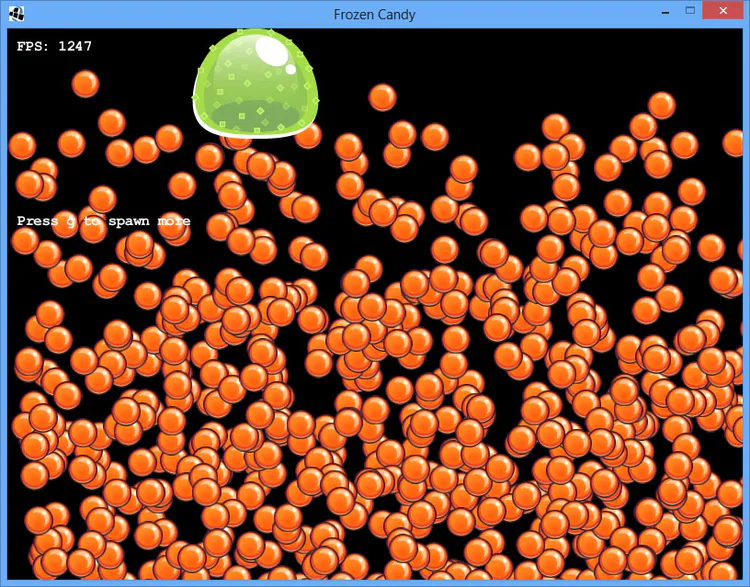
Downloads:
Here’s the entire project and a runnable jar for windows. To get the project to work you’ll probably need to reset the paths to slick2d and LWJGL (use the steps in the tutorial to setup LWJGL linked above).
Heres the code for my main class (FrozenCandy) based on the slick tutorial barebones:. And the GameObject class.















0 comments