


Comments (1)
Wow this is pretty cool...
HubPy - A GUI based Python project manager
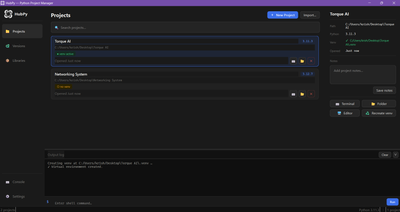
HubPy is a desktop GUI for managing Python projects, interpreter versions, and package environments without touching the terminal.
What Is HubPy?
HubPy is a lightweight desktop application that puts your entire Python development environment in one place. It knows about every Python version on your machine, tracks which packages belong to which project, and lets you manage all of it through a clean GUI without ever opening a terminal.
It doesn't replace pip, venv, or pyenv. It sits on top of them and makes them usable for everyone.
Why Did I Make It?
I made HubPy because I HATE having to use the terminal each time I need to manage a project using conda.
Features
Project Management
Organize all your Python projects in a card-based dashboard
Create new projects with a guided wizard — pick a name, location, and Python version in seconds
Automatically detects existing
.venv,venv, andenvfolders when importing projectsAssign a Python version and virtual environment to each project independently
Open any project directly in your code editor, terminal, or file explorer from the app
Drag and drop a folder onto the window to import it instantly
Add notes to projects so you remember what they're for six months later
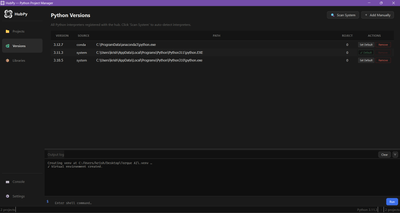
Version Manager
Detects every Python interpreter on your system automatically — system installs, pyenv, conda, Homebrew, Windows Store, and more
Works with Python 2 and Python 3
Supports Windows py launcher,
LOCALAPPDATAinstalls, pyenv-win, Miniforge, Anaconda, and MinicondaSet a global default version used for new projects
Add interpreters manually if the scanner misses something — point it at any
.exeor binarySafely remove versions from the hub without touching the actual interpreter on disk
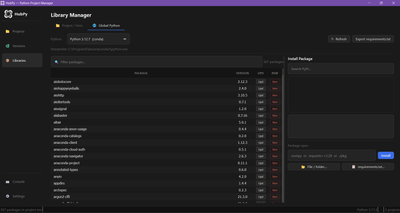
Library Manager
Two separate views so global and project packages never get mixed up:
Project / Venv tab
Manages packages inside a specific project's virtual environment
Shows a warning if a project has no venv, with a suggestion to create one
Install packages by searching PyPI live or typing a package spec directly
Import from a
requirements.txtfile or point to a local.whlor folderExport a
requirements.txtfreeze at any time
Global Python tab
Manages packages on any registered Python interpreter directly
Useful for tools you want available everywhere, like
black,httpie, oripythonSame install, update, and remove workflow as the project tab
Filter through hundreds of packages instantly with the search bar
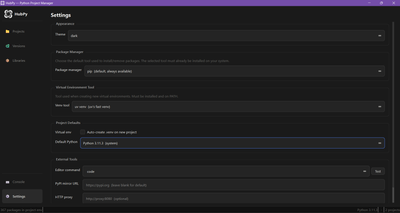
Settings
Theme — dark or light, applies instantly without restarting
Package manager — choose between pip, uv, poetry, pipenv, pdm, hatch, conda, or mamba
Virtual environment tool — choose between venv, virtualenv, pipenv, poetry, pdm, conda, or uv venv
Editor — configure any editor by command name (
code,cursor,pycharm,zed, or a full path). Test button confirms it's working before you need itPyPI mirror — point to a private or regional mirror
HTTP proxy — for corporate or restricted network environments
Auto-create venv — toggle whether new projects get a virtual environment by default
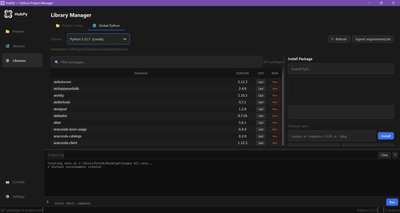
Built-in Console
A resizable log panel sits at the bottom of the app
All pip and venv output streams here in real time so you can see exactly what's happening
Type and run any shell command directly from the input bar — no need to switch windows
Command history with ↑ ↓ arrow keys
Drag the top edge to resize it to however much space you want
What HubPy Can Do
A lot...
Technology
HubPy is built entirely in Python, using only open-source dependencies.
Layer Technology GUI framework PyQt6
Python bindings for Qt 6 Database SQLite via the Python standard library
sqlite3Package operationspipsubprocess callsWorks with any installed package manager Version detection Path scanning, Windows registry paths, pyenv, conda, Homebrew, py launcher PyPI search PyPI JSON API
No API key needed Background tasks
QThreadworkersInstalls and scans never block the UI Distribution PyInstaller
Single
.exeon WindowsThere are no cloud dependencies, no telemetry, no accounts, and no internet connection required for anything except PyPI search and package installation. All data is stored locally in
~/.pyhub/hub.db.
Installation
Just hit Download and extract the zip file. Then just double click on the .exe to start.
Keyboard Shortcuts
Ctrl + 1 Projects
Ctrl + 2 Versions
Ctrl + 3 Libraries
Ctrl + N New project
Ctrl + F Search projects
Ctrl + R Refresh current view
Requirements
Python 3.10 or higher
PyQt6 6.6 or higher
Windows 10+
This software is free to use and distribute. I may think of Open Sourcing the project, but I have no plans as of now.
#pointnclick #other #software #nanometerhorizon #nanometerstudios