

Heyyyyy-o! Time for another update!
Let’s make Game Jolt the best place out there for gaming content creators to post and follow updates, images and videos! So, in this update, we’d like to show you a ton of changes that streamline interacting with feeds, posts and comments. Let’s dive in, shall we?
Feeds
You may have noticed already—or maybe not—but we changed the design of feeds! They’re now more compact, taking less vertical space on the page.
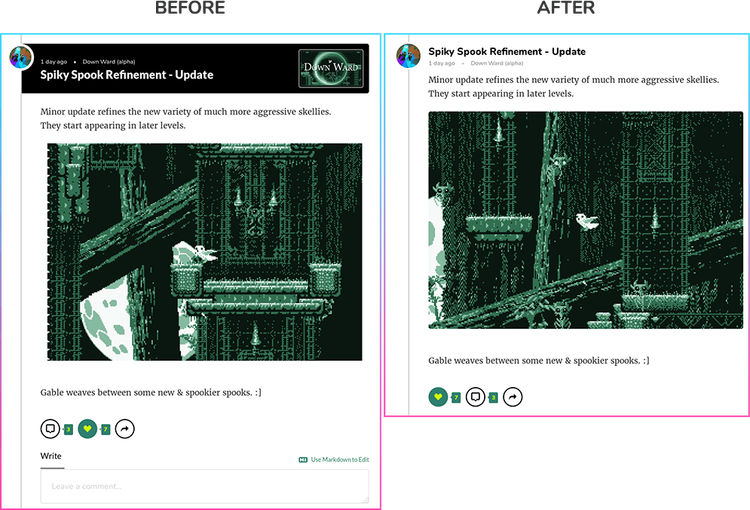
This sets us up for a new post format we’re working on—but we’ll keep that hush-hush for now—as well as making it faster to scroll through.
And rather than showing comments under the post when you click “View Comments”, they now show in a modal. This allows feeds to load in fast while keeping the comment list neat and tidy. Which brings us to…
Comments
Yup, the design of comments changed, too! Look how beautiful:
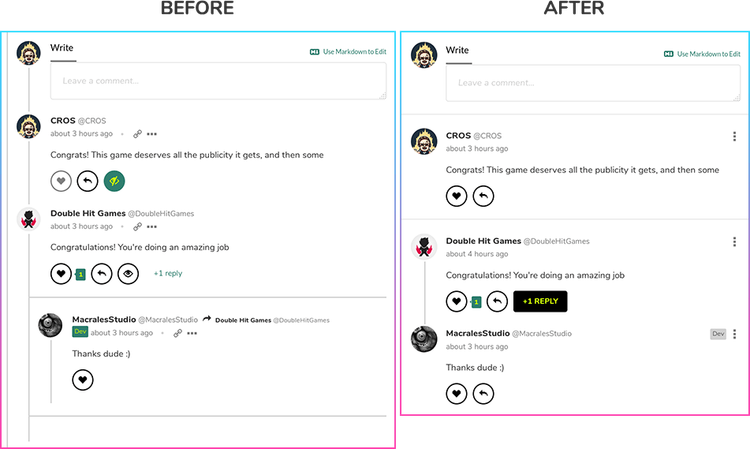
You’ll notice that I tried tidying up the comment styling, although the biggest change is that you no longer have to deal with line-ception! All comments now start at the same left position, and we instead separate threads by connecting the avatars in the thread with a vertical line.
Your eyes should now be able to move faster when reading comments, but I’d love to hear your thoughts!
Realtime Notifications
Get new posts to your brain right as they happen.
On your Activity Feed page you’ll see a banner at the top, allowing you to enable browser notifications. By clicking allow, you’ll be the first to know of a new update or post on the games you follow. Get those #first comments ready!

With the latest version of the Client, we also send you realtime system notifications.
Not a fan of realtime notifications? No problem, turn them off any time through your Settings page.
Performance
And last, but definitely not the least of these updates, we also worked on performance improvements for scrolling through games and feeds. The changes are fairly technical, but we hope you see an improvement in the overall feel of these pages.
Cheers
That’s all for now! Leave your thoughts below. Keep having fun!


125 comments