Game
JUMP!
7 years ago

New Level Editor


The new level editor is almost ready. Here’s how it looks!
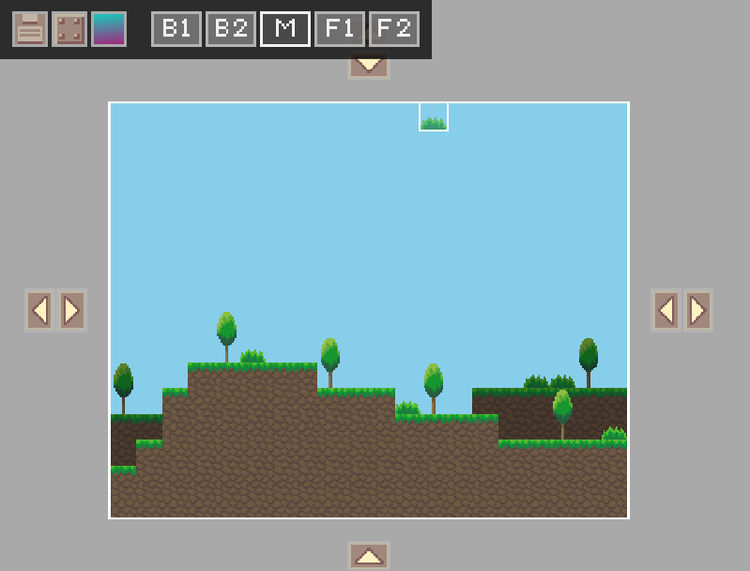
5d099a568ab2d.png

The first three buttons are for saving/loading a level, opening the tile selection menu and for adjusting the background colors. The next five buttons are for switching between layers. The arrow buttons at the side of the editor are for resizing the level. You can make maps as large or small as you like now!

1 comment

Loading...

Next up

Vertex Array Backgrounds Here’s a background example from 0.4.0

Level Editor Progress The level editor is almost finished! Below you can see a screenshot of the new interface. Please note that not all tiles have been implemented yet and some textures are placeholders.

0.5.0 Keys And Locks This feature was suggested by a user. The next update will introduce different types of keys and locks for better level design. Each key will open a specifc lock. For example, a golden key will open a golden lock.

0.5.0 New Tiles! Here are some of the new tiles that will be added in 0.5.0. Also, the tile selection screen now displays the tiles in a more organized manner.

Smile! Here, take some happy pills! ✨💊 #Blender #3DModelling #3DArt Buy me a Ko-fi: https://ko-fi.com/barbarafb_

Here's a peaceful little forest scene for this #screenshotsaturday, from the beginning of the game.

I have added rewards for quests so that villagers can give you something in return for your hard work helping them. 🥳

I want to know - what's your favourite quest reward?

Just a Pico sprite

Strange Umbrella

Terraria