

Loading...
10,205
5 years ago

Setup your computer to stream video using OBS or Streamlabs


Follow this guide to get OBS (or Streamlabs OBS) set up to stream some sweet video.

If you don't have either yet, download OBS or Streamlabs OBS. We recommend OBS for getting started.

Open the program that you installed.

Adding a Video Source

In the “Sources” section, click on the + icon to add a new source.

Choose “Game Capture” or “Window Capture”, depending on the program you’re trying to show, and select what you want to capture.

  • If “Game Capture” doesn’t show up or it can’t find the program you want to show, you may need to use “Window Capture” instead.

Right-click the source you just added in the Sources list. You can hover over Transform and select Fit to Screen to quickly get your video looking good.

When you’re happy with the way things look, we can start the Virtual Camera for the program you downloaded.

Virtual Camera for OBS

Click “Start Virtual Camera” (bottom right of the OBS window).
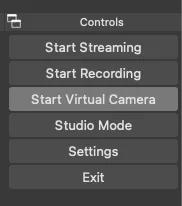
pasted_image_0.png

In your fireside streaming device options, choose “OBS Virtual Camera” from the dropdown.

Virtual Camera for Streamlabs OBS

Click the gear ⚙️ icon in the bottom left of your Streamlabs OBS window.

Click on the “Virtual Webcam” 📷 menu option in the window that opens up.

  • You may need to click “Install Virtual Webcam” if you haven’t before.

  • Important! After you install the virtual webcam, you will need to restart Chrome so that it can learn about your new virtual device.

Click “Start Virtual Camera”.

In your fireside streaming device options, choose “Streamlabs OBS Virtual Webcam” from the dropdown.


1
1
1
1


122 comments

Loading...

Next up

Happy #WIPWednesday! Are you working on a game? Making some art? Practicing a song? Something else? Tell us in the comments!

Lucky Tower Ultimate is a chaotic, comedy roguelite. Escape from an incredibly dangerous, randomly generated tower in a slapstick adventure that looks like a cartoon and feels like a joke. Slashy slashy! 

Wishlist the game now: https://bit.ly/LuckyTowerUltimate

@ludenio is a Jolter to Watch and indie game dev focused on educational games! Follow @ludenio and their game SuperWEIRD: Idle Automation before the quest ends on April 21 and you'll get Coins!

This week's Fan Art Friday celebrates Mega Man! Accept the quest in your quest log to get started.

This week's Fan Art Friday celebrates KPop Demon Hunters! Accept the quest in your quest log to get started.

Happy #WIPWednesday! Are you working on a game? Making some art? Practicing a song? Something else? Tell us in the comments!

@Benaiez is a Jolter to Watch and game dev! Follow @Benaiez before the quest ends on April 14 and you'll get Coins!

We have a question and we wanna know: Do you prefer console or PC? Complete the quest and you'll get Coins!

Quests inspired Ys Memoire: Revelations in Celceta have entered your quest log!

Complete them before they expire to get Coins and trophies!

The game is coming to Nintendo Switch on April 28, 2026: https://bit.ly/WorldOfYs

Discover the Characters of Ys Memoire: Revelations in Celceta!

The game is coming to Nintendo Switch on April 28, 2026: https://bit.ly/WorldOfYs Quests inspired by the game have entered your quest log!

Learn about the characters 🔻