
View this post on logicworld.net
Friends/RPC system - Felipe
One problem of releasing Logic World on multiple platforms is not having a way to easily connect with your friends that have bought the game on a different shop. Thus, I set on to build a friends system, akin to that of steam (although much more barebones). This means that you’ll be able to chat with your friends and join their games, no matter where they got their copy of the game from, be it Steam, Itch.io or Gamejolt!
The system is powered by a gRPC server running on the cloud, to which clients will connect to in order to send and receive messages in real time. This whole system is completely opt-in, meaning that we won’t bother you at all if you choose not to create an account.
Game ownership verification - Felipe
To access the friends system, we must verify that you’ve successfully bought the game, which you can prove through your linked Steam account or by authenticating on itch.io. You only have to do this once, and you’ll be able to add your friends!
Component Flipping - Jimmy
A number of components in Logic World have parts on both sides of circuit boards. This week I’ve added a building mechanic that lets you flip these components upside down, either before or after you place them.
Remote World Downloads - Jimmy
In Logic World, the client and the server use the same code to store their internal physical models of the world, and this model is synchronized between the server and all the clients that are connected to it. Previously, only the server had access to the code that generates save files from this model of the world. I’ve modified the save code to work without the server, only that shared physical model of the world. This means that when you’re connected to a server, you now have the ability to download that server’s world.
Save Options - Jimmy
Logic World has two methods of saving your progress. First, it will save your game to the current save file. Second, it will automatically backup your save file, just in case. This week I’ve been working on making these two systems more configurable, and you now have the following options:
automatically save when the game is closed (true/false)
enable/disable autosave
time interval between autosaves
enable/disable auto-backups
time interval between auto-backups
an option to make a backup every time the game is saved (this would be in addition to auto-backups if you have them enabled)
the location on disk which backups are saved to
the maximum number of backups to keep per-save before the oldest one is deleted
Image Embeds - Felipe
Currently, if you want to upload an image to a post on the forum you’d have to previously upload it to an image uploading site (we were using Imgur), and then insert the image using Markdown notation. However, now you can directly upload images to logicworld.net and insert them into your post by writing {{!N}}, where N is the index of the image you’re referencing. Here’s how the UI looks like at the moment:
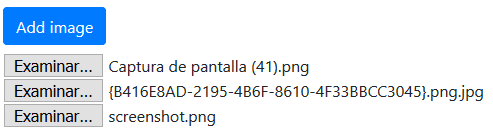
I do want to make it prettier but this works for now, even if it’s not the best UI.
Search Shortcuts - Jimmy
Last week @woox2k left a comment suggesting a keyboard shortcut for the search function in the selection menu, and this week I’ve added it. When you run a search, you can now press enter to add the first search result to the end of your hotbar. It also selects the entire search box so you can immediately begin searching for another item without having to use backspace. There are a few more advanced shortcuts as well:
alt+enterwill add the item to the beginning of the hotbar instead of the endshift+enterwill replace the currently selected hotbar slot with the itemctrl+enterwill insert the item into your hotbar right after the currently selected hotbar slot
I’ve found that these become muscle memory quite quickly, and they allow experienced players to edit their hotbar without ever using the mouse.
If you’d like to receive an email each time we post one of these blogs, you can sign up for our newsletter. Be sure also to join the official Discord and follow @LogicWorldGame on twitter.
See you next Wednesday!













0 comments