
This article has been reposted to my GameJolt profile’s blog from my real blog, Torben’s Game Dev Log.
*
Hello everyone!
As I said, posts may be few and far between but I hope they will be decent when they do come. Okay, so today I was working on rendering resource management and in general rendering by itself as well. My main questions were, how is this “properly” setup? I have been having my objects do their own rendering like this:
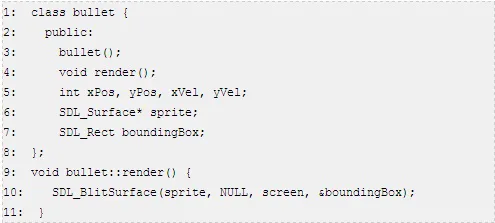
Just to give some pseudo code. This means that the bullets were rendering themselves, I thought this was a good idea because it meant (or so I thought) that I have the utmost control over where and how my bullets were being rendered. This turned out to be a complete fallacy.
After reading a fantastic Gamedev Stack Exchange Q/A I realized that the opposite was actually quite true. By limiting myself this way, I was forcing myself to have my graphics library so far embedded into my programs that there would have been many hours of effort involved in changing graphics APIs if I so desired, it was incredibly coupled, the exact opposite of what we want in our programs.
By creating something like a rendering manager, I could not only completely decouple my objects from rendering functions, but in fact, it offers a lot more control over what I am doing with my resources at the same time.
Previously I used to have this class called “SystemManager” which would, since I am making tiny games (still learning!), actually contain all the resources within it, SDL_Surface pointers to my tilesheet or player sprite, etc. The objects would then get passed these through special functions, etc. It was a huge mess!
Now, with a rendering manager that actually does all the rendering for all objects, as apposed to the old rendering manager which called the object.render() function, I can have much more control of when things get rendered as well. So instead of just having to make sure I call the background.render() before I call the tiles.render(), I can easily just order out my calls in any order I want at any given time, detect if two images are overlapping and only render one of them to save CPU/GPU time, etc.
There are a ton of other great possibilities using this method, but the primary one I focused on was resource management.
Instead of typing everything out again and explaining it to you piece by piece, I think I’ll just leave a big “notes drop” and then sum up. This way there is actually room for the reader to expand on what I currently know and even offer suggestions on my plan of implementation as well.
*Rendering Resource Manager (RRM):
A struct, the struct contains a string and an SDL_Surface. When you make a render-able object you pass a string to the RRM which will then check against all the strings available in a vector of these structs. Once it finds one, it will return to you the index of that struct so you can store that integer value (index number) as apposed to the asset itself, which would require objects storing an SDL_Surface, which is not preferable by any means.
Rendering objects may also have an enum for memory management and quick accessing. What this means is, there would be 2-3 states, “proprietary”, “actors”, and “statics” in this enum. The render-able object would set this (default of static?) and this would be read and determine where in the vector the struct gets placed.
For instance, if you have a bullet. Something that is going to be deleted and created very very often (note that every time you create a new bullet you call the RRM to either load the sprite or get the index for it) you will be using a lot of time scanning the list of strings for that file path. You don’t want to have the bullet sprite loaded somewhere random, you want to make sure it is as low in the list as possible, this way it is found as fast as possible when this function is called. The moment it is found, you can return and continue doing your other stuff. If it was later on in the list (let’s say, index 790, there are a ridiculously massive amount of sprites in this level) you will have to scan through and do string comparison for tons of different file paths before you actually find it.
This can further be expanded to have the bullet sprite (which is something set to proprietary) only search in it’s own segment of the memory map. Once it has completed it’s search through the proprietary section, if no matching file paths were found, it will insert itself at the end of the proprietary section. The problem with this, is any index value after that other objects currently have stored, is then invalid. It may just be easier to insert the bullet at the end as it is something that was loaded “on the fly”.
The struct might actually be better off containing the enum value as apposed to the object itself, it would help this all remain slightly cleaner as well.
The Render-able Object would simply be a class inheriting from a “RenderableObject” class. Then calling functions passing parameters to set the appropriate struct values like sprite, file path, and possibly the enum state as mentioned above.
It is potentially possible that the map file itself lists all of the proprietary objects and paths, this will take further thinking. The problem with the proprietary state with Bullets, is that it requires at least one bullet to make the call before the bullet is loaded, if this is done after memory management has allocated everything else, then it will be loaded onto the end of the entire list, completely shattering the whole point in having the proprietary state. So, by having the map file state all the proprietary sprite file paths, these will be already loaded and ready to go when the first bullet gets created and no problems will occur in that regard.*
So, overall by creating only a single class called RenderableObject or something of the sort, I can actually have full control over not only the action of rendering for all render-able objects in my game, but actually have control over where they are stored in this vector and have quick access to loading the resources for new objects that have already been loaded in the past.
There is still so much to learn on this topic I know, and I plan to keep at it. This is an exciting adventure and new stuff comes around the corner almost every day. Keep coding, keep having fun, and I hope you’ll join me next time for more ramblings!














0 comments