Comments (3)
The moment we've all been waiting for

Potrzebujesz może osoby która podłoży głos pod postać? Jak tak to możesz pisać na Discordzie: Nekeniak
Five Nights at Radosław
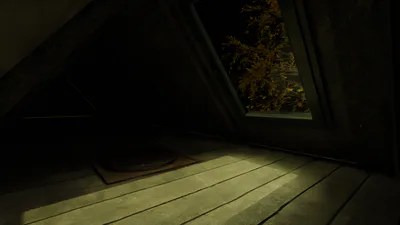
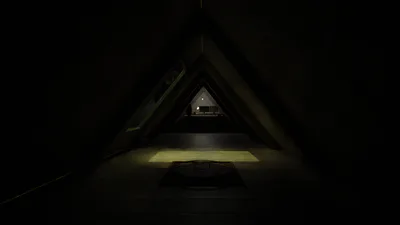
Five Nights at Radosław is a strongly inspired on Five Nights at Freddy's Series made by Scott Cawthon game. You have to survive on the attic encountering many creatures. Huge credits to N0va (@bestfriendn0va) for story voice-over. If you have trouble passing the game, contact me on gamejolt I'll explain the mechanics.
Tutorial:
In this immersive survival horror experience, you find yourself trapped in the attic of your own home. Your objective is to survive until 6 AM, but the night is fraught with dangers lurking in the shadows. You begin the game seated at a computer, where you can control the ventilation and air conditioning systems. It's crucial to maintain the right balance—ensure the temperature doesn't get too high, and that oxygen levels remain stable. These parameters must be carefully monitored throughout the night.
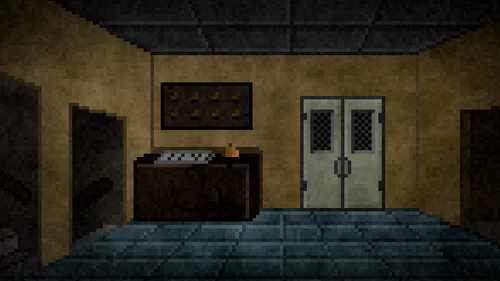
Turning around from the computer places you in a hallway, where you can use a flashlight by pressing 'CTRL.' Frequent use of the flashlight in the hallway is essential to ward off any lurking creatures. As you move down the hallway, you can approach the bunker door. Here, you must listen carefully in the darkness for any signs of breathing. If you hear something, close the bunker door immediately and wait for the creature to retreat. If you don't hear anything, shine your flashlight to scare it away.
To the right of the bunker door, you'll find a window. Periodically check this area with your flashlight to prevent creatures from getting too close. Be aware that the presence of these entities varies depending on the night, with some nights being far more intense than others.
Controls:
General Movement: You can switch positions in the game by moving your mouse over the grey rectangles located at the bottom, left, or right of the screen.
Office Position:
Press 'X' to turn the computer on/off.
Click the "VENTILATION" button on the computer to activate ventilation.
Click the "A/C COOLER" button on the computer to activate air conditioning.
Move your mouse to the grey rectangle at the bottom of the screen to turn around.
Hallway Position:
Press and hold 'CTRL' to toggle the flashlight.
With the flashlight on, click the left mouse button in the direction of the bunker door to move towards it.
Move your mouse to the grey rectangle at the bottom of the screen to turn around.
Bunker Door Position:
Press and hold 'CTRL' to toggle the flashlight.
Press and hold 'SHIFT' to close/open the bunker door.
Move your mouse to the grey rectangle at the bottom of the screen to return to the hallway.
Move your mouse to the grey rectangle on the right side of the screen to turn towards the window.
Window Position:
Press and hold 'CTRL' to toggle the flashlight.
Move your mouse to the grey rectangle on the left side of the screen to turn back to the bunker door.
Survival requires vigilance, strategic use of your equipment, and a sharp ear for the subtle signs of danger. Can you make it through the night?
---------- JĘZYK POLSKI
Gra, którą masz przed sobą, to emocjonująca rozgrywka typu survival horror, której akcja rozgrywa się na strychu twojego domu. Twoim zadaniem jest przetrwanie nocy do godziny 6:00 rano, jednak nie będzie to łatwe, gdyż napotkasz na swojej drodze tajemnicze i niebezpieczne stworzenia. Aby sprostać wyzwaniu, musisz skutecznie zarządzać dostępnymi narzędziami oraz wykazać się refleksem i opanowaniem.
Grę rozpoczynasz w pozycji przy biurku, gdzie znajduje się komputer, za pomocą którego kontrolujesz wentylację i klimatyzację. Utrzymanie odpowiedniej temperatury i poziomu tlenu jest kluczowe dla twojego przetrwania – nie pozwól, aby temperatura wzrosła zbyt wysoko, ani żeby poziom tlenu spadł zbyt nisko. W każdej chwili możesz obrócić się do tyłu, co pozwoli ci wejść w korytarz prowadzący do bunkra.
W korytarzu masz do dyspozycji latarkę, której użycie może zadecydować o twoim losie. Regularnie oświetlaj korytarz, aby odstraszyć zbliżające się stworzenia. Latarka umożliwia także przemieszczanie się w kierunku drzwi bunkra, gdzie musisz nasłuchiwać ewentualnych odgłosów, które mogą świadczyć o obecności niechcianego gościa. Jeśli usłyszysz oddech w ciemności, natychmiast zamknij drzwi i czekaj, aż rozlegnie się dźwięk odchodzących kroków. Jeżeli nie usłyszysz żadnego oddychania, zaświeć latarką, aby odgonić wszystko co czyha w ciemności.
Po odwróceniu się w prawo od drzwi bunkrowych znajdziesz się przy oknie, gdzie również musisz zachować czujność. Latarka to twoja jedyna broń – używaj jej z rozwagą, aby przetrwać do świtu. Pamiętaj, że pojawianie się stworzeń może być losowe, a ich intensywność wzrasta wraz z upływem nocy.
Sterowanie:
Biuro:
Naciśnij 'X' aby włączyć/wyłączyć komputer.
Naciśnij przycisk "VENTILATION" na komputerze, aby włączyć wentylację.
Naciśnij przycisk "A/C COOLER" na komputerze, aby włączyć klimatyzację.
Najedź myszką na szary prostokąt na dole ekranu, aby odwrócić się za siebie.
Korytarz:
Naciśnij i przytrzymaj 'CTRL' aby włączyć/wyłączyć latarkę.
Mając włączoną latarkę, kliknij lewy przycisk myszy w obszar w kierunku bunkra, aby przejść w tym kierunku.
Najedź myszką na szary prostokąt na dole ekranu, aby odwrócić się za siebie.
Drzwi bunkrowe:
Naciśnij i przytrzymaj 'CTRL' aby włączyć/wyłączyć latarkę.
Naciśnij i przytrzymaj 'SHIFT' aby zamknąć/otworzyć drzwi bunkrowe.
Najedź myszką na szary prostokąt na dole ekranu, aby powrócić do pozycji korytarza.
Najedź myszką na szary prostokąt po prawej ekranu, aby odwrócić się do okna.
Okno:
Naciśnij i przytrzymaj 'CTRL' aby włączyć/wyłączyć latarkę.
Najedź myszką na szary prostokąt po lewej ekranu, aby odwrócić się do drzwi bunkrowych.