
Comments (1)

I know this all from the sudden but add some trophy if the player create something so it will have a fun learning curve with trophies+you learn this and that along the way good game by the way this is just an example you might wanna consider
OMORI Sandbox
About
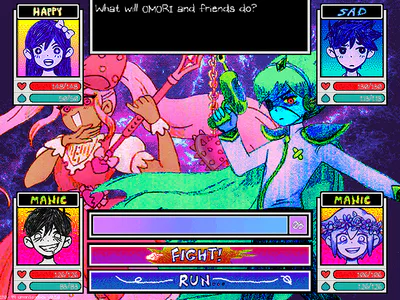
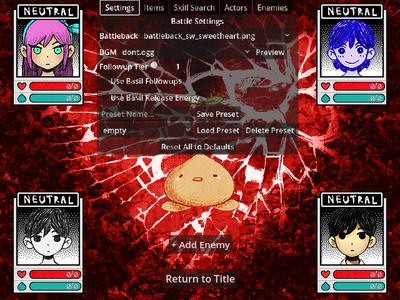
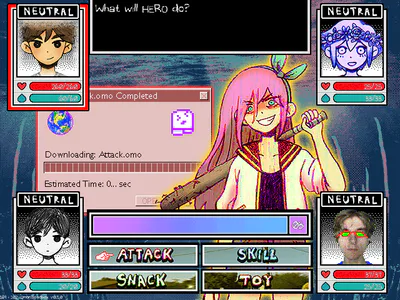
OmoriSandbox is a recreation of the OMORI battle system in the Godot game engine, mainly written in C#. It aims to recreate the battles from OMORI as accurately as possible, while allowing for any combination of party members, enemies, skills, and items, much like a sandbox mode in other games.
Currently, the program is in an alpha/pre-release state, meaning that some features from the base game are currently not available and/or there are bugs with the program itself. However, some notable features (as of writing) are as follows:
Completely customizable battles via a visual GUI editor. Change the battle's battleback, BGM, enemies, party members, skills, items, and other aspects of battle to your liking. Or, share your created preset and have others try defeating your creation.
Supports modding via an official modding API.
Re-adds Basil as a playable character, including his skills, followups, and release energy from the console versions.
Patches some bugs from the base game to improve gameplay. However, some bugs were intentionally recreated.
The project is open source and is available to view on the Github page linked below. You can read more about the project, follow development progress, contribute to the project, or report bugs and issues there:
https://github.com/EBro912/OmoriSandbox
An official modding Wiki is also available if you would like to create mods for OmoriSandbox:
https://github.com/EBro912/OmoriSandbox/wiki
You can also join the Discord server for further support or to share your presets and mods with others:
As the project uses assets from the base game, the project is and always will be free to download on here, Itch.io, and GitHub. Any other sources that claim to charge money for OmoriSandbox are scams and should not be trusted.
Installation
Simply download your system's respective archive and extract the contents to any folder. There are two versions to choose from:
For Windows Users
OmoriSandboxuses the Vulkan renderer and works best on newer systems. Recommended for most users.OmoriSandbox Compatuses the OpenGL renderer and works best on older systems. Use this if you're having issues with the Vulkan version.
Either archive should contain two executables:
OmoriSandbox.console.exe: Runs the Sandbox alongside a seperate console window. Useful for viewing debug information and any errors that may occur while using the Sandbox. (Recommended)OmoriSandbox.exe: Runs just the Sandbox without a console.
To run the Sandbox, simply run the desired executable after extracting.
For Linux Users
OmoriSandbox Linuxuses the Vulkan renderer and works best on newer systems. Recommended for most users.OmoriSandbox Linux Compatuses the OpenGL renderer and works best on older systems. Use this if you're having issues with the Vulkan version.
To run the Sandbox, you can either use the provided OmoriSandbox.sh script, or run the OmoriSandbox.x86_64 executable directly.