
I was going through my screenshots for Starfire and I noticed something: the turn speed indicator wasn’t showing up!
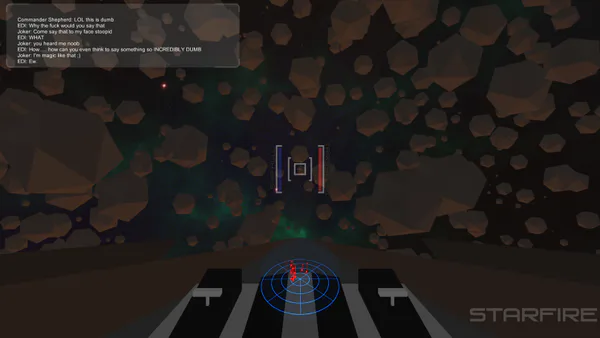
It should be right below the radar, like this:
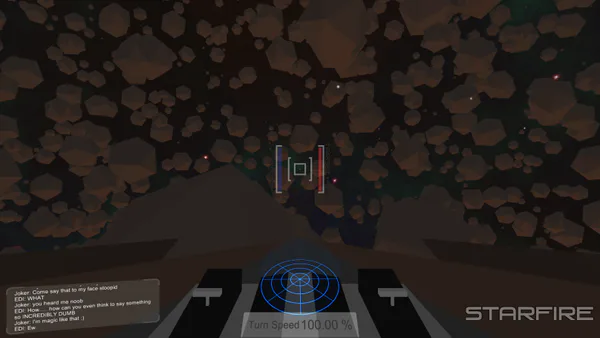
But for some reason, it wasn’t showing up! So I went into my code to figure out what was happening. Part of my screenshot code was trying to hide the GUI in Unity by finding the Canvas and hiding it. The problem with that though was that I had multiple canvases, so it was hiding the wrong canvas. I got rid of that code, but the GUI I wanted still wasn’t showing up.
Then I remembered that I take my screenshots at 2x resolution, which always made my game stutter. The interesting thing about that though, that I didn’t notice until after I turned off GUI hiding, is that the cockpit GUI stutters a bit when I take a screenshot.
The cockpit GUI is screen space: camera. That means that it is basically flying around with the camera, almost as if it is a child of the camera. The problem with this though, is that it lags a little bit behind the camera because it’s always playing catch-up with the camera. Normally this lag isn’t noticable, because everything updates so quickly that the one frame lag isn’t really that big of a deal.
However, when I do a screenshot, that lag is incredibly obvious. In other words, the GUI wasn’t showing because it hadn’t caught up with the camera yet. Obviously this wouldn’t do. So, I needed to fix that somehow. In the end, I fixed it by taking a 1x screenshot, which reduced the lag enough that the GUI lag wasn’t an issue.
Weird though, right?









0 comments