
Here is the script:
The header text in the script tells you all the instructions you need, but I'll put the general stuff here just in case:
To run it, put this in a script call in an event:
Graphics.play_movie( "Movies/videoname.avi", true, true )
You can leave out the two "true" values at the end as they are just these extra settings:
- cancellable = true if you want to allow the player to stop the video by pressing Enter or Escape, false otherwise.
- fit_to_screen = true if you want the video to be stretched to fit the screen in case it doesn't match, false if you just want it to be centered. If you're using scripts like Fullscreen++ true is recommended. (You can get the Fullscreen++ script here: https://pastebin.com/raw/kc1hzBek)
---------------------------------------------------------------
In case you have a script that works as an options menu with bgm volume, bgs volume etc...
And you want to adjust the volume of the video, do this:
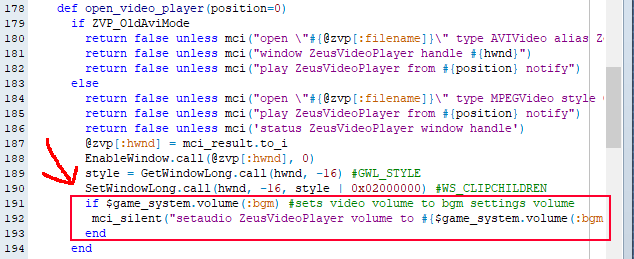
Go to line 190 and paste this code below it:
if $game_system.volume(:bgm)
mci_silent("setaudio ZeusVideoPlayer volume to #{$game_system.volume(:bgm)} ")
end
This sets the video volume to the bgm volume set in the Yanfly System Options script as seen by "$game_system.volume(:bgm)"
(I just noticed that using the volume this way may lower the video volume too much, so in case you notice the volume being lower than usual, add a *10 next to it to multiply the number by 10.) example: $game_system.volume(:bgm)*10
You can change that to whatever code your system options script uses to adjust volume, in case you have a different one.
If you want to set a specific number, just replace the
#{$game_system.volume(:bgm)} in the mci_silent code with any number, and it should work. Example:
mci_silent("setaudio ZeusVideoPlayer volume to 50")
Here's more about the mci setaudio code if you feel like reading it:
https://learn.microsoft.com/en-us/windows/win32/multimedia/mci-setaudio
#rpgmaker #rpgmakervxace #rpgmakervx #rpgmakerxp #scripting #videoplayer #ruby #rgss





2 comments