Game
Hensen Hopper

21 days ago

I made some updates to the hints system! Now it reads from the message hub to determine when to show hints and the hint texts now come from the lang system I wrote yesterday. This simplified my the hints handling algorithm A LOT from what it used to be!


Before I had a bunch of serialized strings with the text for each hint and it had been reading from multiple otherwise irrelevant scripts in order to know when to show each one. With the addition I made yesterday of the messages and lang systems, it dawned on me that I had given myself a way to simplify the hints system A LOT!
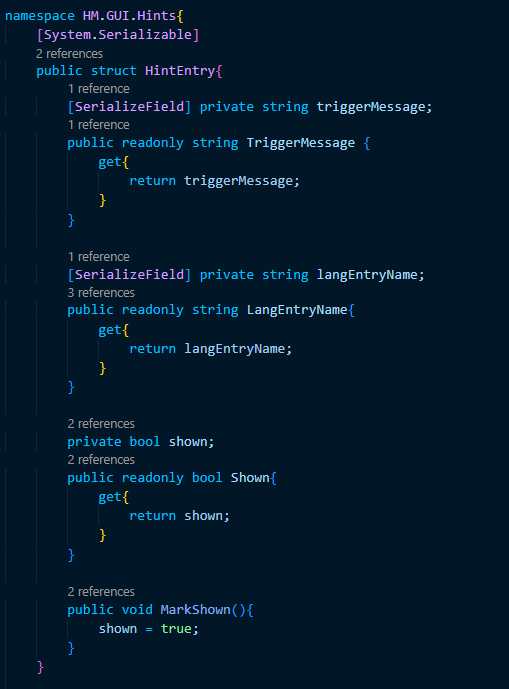
image.png

For starters, I wrote this struct so I can add and modify hints from the inspector window. My idea when writing this was that the handler algorithm would display the definition of langEntryName in the user's language in the hint box in the HUD whenever a message matching triggerMessage is recieved by the message hub. In order to stop hints from showing repeatedly, there's also a boolean that will be updated to true when the hint has been shown.

Side note: One of my favorite aspects of the C# language is the ability to use the get property for the purpose of writing public accessor fields in particular. They're a lot more concise to my brain than having to write "GetTriggerMessage()" or "GetShown()" in my code.
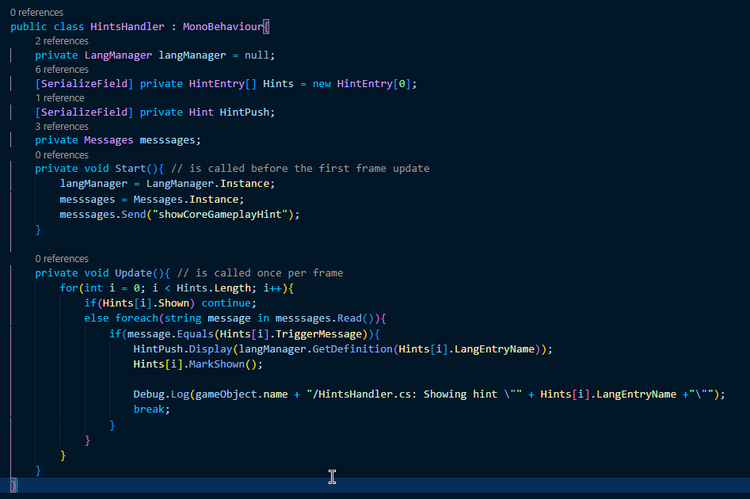
image.png

My favorite part is how the HintsHandler class itself is hilariously shorter and more concise than it was. The algorithm in the Update method loops through each hint entry (ignoring it if it has been shown) and reads through the messages recieved by the message hub to check for the trigger message, displaying the hint's text in the hint box if the message is found. In order to show the core gameplay mechanics hint immediately, I just send that message on start, simple as that.

The only drawback here is the small delay that comes with the way my message system has a 1 frame delay between when a message is sent and when it's been recieved (you can see this post I made yesterday if you're curious as to why this occurs). It's not particularly noticeable unless you're running at a low framerate, though.



0 comments

Loading...

Next up

This is a much larger (in terms of resolution) video than I've shared here before!!!

This is a full round of Hensen Hopper in it's current state! I mainly recorded this to showcase the new wave difficulty curve algorithm I've been working on!

I've been working on some proper visual art for the beetle shell when it's equipped! I've also gone ahead and drawn a break animation for it. All I need to do now is actually set all of this up in Unity which I'll probably do on Tuesday.

Here's a short demonstration of the beetle shell power-up in-action! It's not very obvious what it does at the moment because I still need to work on a lot of the effects for it, but the functionality is there if you pay attention to the health bar!

Doki Doki Literature Club is celebrating Monika's birthday and the 8th anniversary of DDLC with exclusive stickers, avatar frames and backgrounds on Game Jolt! 

Head over to the shop to collect yours 👉 https://gamejolt.com/#shop

I've been working on the sprite for the beetle shell power-up drop! I'm thinking when you collect this one, it will kind of poof away similarly to the enemies when they're defeated and play an "equip" sound.

Mae Borowski is the main character of Night in the Woods! It's an adventure game that tells the story of her return to her hometown of Possum Springs. She was confirmed as canonically pan in a social media post by the game's creator Scott Benson.

I wrote a modular language system! I can now add new entries with definitions in as many languages as I please and all from the inspector window in the Unity editor! This allows me to potentially have Hensen Hopper translated to other languages easily!

Oh yeah, also, I updated that algorithm for dash handling I shared yesterday so I can set the dash duration via the inspector window!

Happy Joltidays! A new quest has entered your quest log. Accept the quest and follow @ElPichon to open today's slot on the calendar.

Okay, so I've gotten the functionality for the beetle shell render over the player working! (using the first 3 frames from the beetle shell collect animation as placeholder sprites, these ARE NOT the final sprites)