
Hey guys!
When writing your own editor scripts you’ll come to the point where you have to check whether or not a certain key (like Alt or Ctrl) is pressed. You may end up with the most obvious solution like the following:
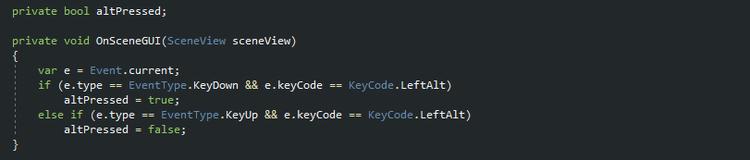
That’s cool, but it gets really unhandy if you need to add more buttons like the following:
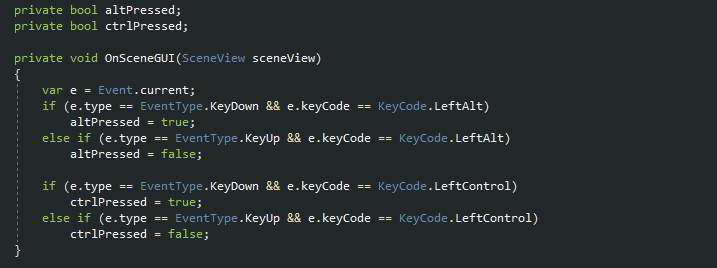
Even worse is that for each editor script you have to repeat that process - this smells like bad code ^^
Static constructors are great!
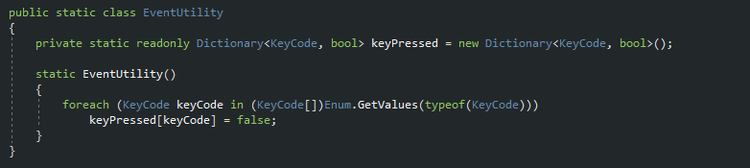
I came up with the following solution: I’m creating an EventUtility-class containing a static Dictionary that stores a boolean for each possible KeyCode. Within a static constructor I initialize every possible KeyCode with false:
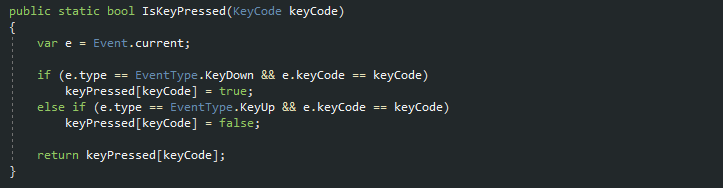
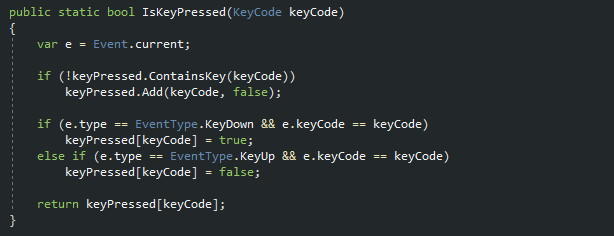
Then I’m providing a static method which takes care about the key state and returns whether or not the key is pressed:
Lazy Method
If you don’t want to prepare the dictionary in the static constructor beforehand, you can make IsKeyPressed(…) lazy:
Other Problems
Sadly it’s not that easy because once the SceneView loses keyboard focus and regains it, it needs some frames before it detects, that the Alt-key is pressed and therefore returns false even though the user holds the key.
In one of our next posts, I’ll show you how to create a nice SceneViewEditorWindow which prepares some neat features for working with EditorWindows that uses SceneView-Features and provides a solution for the Focus-problem!
Thank you very much!
















0 comments