


#horror #arcade #pointnclick #other #strategy
An intense, browser-based survival strategy game
Quick Info
Estimated Playtime: 15-60+ minutes per session (varies by strategy)
Game Modes: Infinite Survival, Timed Challenges, Custom Scenarios
Browser Version: ~8 MB, works in Chrome, Firefox, Edge, Safari
Desktop Builds: Windows, macOS, Linux (~25 MB each)
Playable On: Laptop, Desktop, Tablet
Development Status: Active - Regular monthly updates
Trailer & Media
Screenshots
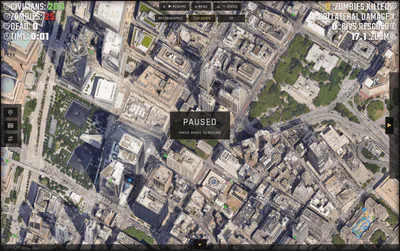
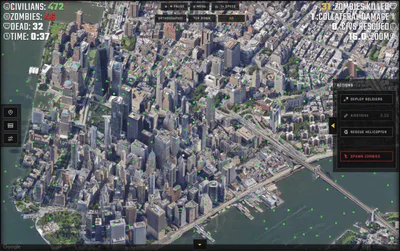
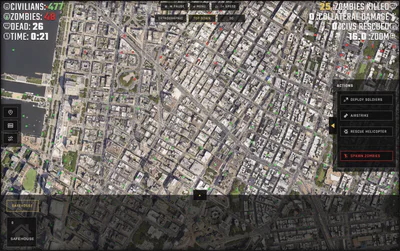
Top-down strategic view
3D immersive perspective
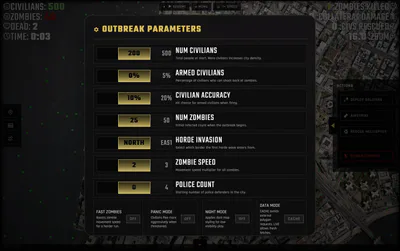
Detailed HUD and information panel
Overview
Humans vs Hordes: Simulator is an intense, browser-based survival strategy game inspired by the classic Zombie Outbreak Simulator (2009). Take command of civilians, police, soldiers, and emergency teams as you fight to outsmart and outlast a relentless zombie horde. Experience a seamless blend of tactical management, dynamic outbreak behaviour, and striking visual feedback, all crafted to deliver a gripping survival challenge with deep strategic possibilities.
How It Works
Every play session unfolds on a dynamic outbreak map, supported by a responsive HUD and intuitive action panel. Deploy soldiers, call airstrikes, launch rescue helicopters, build safehouses, or unleash additional zombie threats for an extra challenge. Powerful simulation systems track survivors, infected, casualties, rescues, and combat stats as the city shifts between calm, chaos, and all-out battle.
Gameplay
Key Features
Dynamic Simulation - Live outbreak simulation with civilians, infected, armed units and evolving zombie threats
Strategic Tools - Deploy soldiers, call airstrikes, send rescue helicopters, place safehouses, and control zombie pressure on demand
Multiple Perspectives - Switch between top-down, orthographic and immersive 3D camera modes
Detailed Tracking - Clear on-screen HUD monitoring survivors, infected, casualties, rescues, kills, and elapsed time
Fast Controls - Quick mouse targeting and fast keyboard workflow with customizable keybindings
Deep Strategy - Balance short-term tactical responses with long-term survival strategy
Controls & Gameplay
Mouse Controls
Select tools from the action panel on the side, then click on the map to target your interventions. Respond to outbreak hotspots in real time and manage the crisis dynamically.
Keyboard Shortcuts
SPACE - Pause/Resume
I / O - Zoom In/Out
ESC - Cancel Tool
Customizable - Full keybinding support
Getting Started
Start each session by surveying the city and selecting the best interventions for the current outbreak. Watch your HUD for civilian, zombie and casualty counts, then choose the right tools to protect survivors and contain infected zones. The game is about balancing short-term response and long-term survival as the horde grows and the outbreak spreads.
Strategy HUD
Camera Modes
Choose your perspective with top-down view for tactical planning, orthographic view for strategic clarity, or 3D immersive mode to experience the outbreak up close. Use the top bar for quick access to camera switching, pause controls, speed adjustment, and zoom functionality.
System Requirements
Component Minimum Recommended Platform Modern web browser with WebAssembly support Desktop build for Windows, macOS, or Linux CPU Dual-core processor Quad-core processor or better GPU Integrated graphics Dedicated GPU for smoother visuals Memory 4 GB RAM 8 GB RAM or more Browser Latest Chrome, Firefox, Edge, or Safari Latest stable browser version with updated drivers
Humans vs Hordes: Simulator is optimized for smooth simulation on modern systems and will run best with a current browser and updated graphics drivers.
Accessibility
Pause Functionality: Fully pausable at any time - take breaks whenever you need
Customizable Controls: Fully remappable keyboard bindings - adapt to your playstyle
Speed Control: Adjust simulation speed (0.25x to 4x) for your comfort level
High Contrast UI: Clear, readable interface with adjustable text sizes
Color-Blind Friendly: Distinct visual indicators beyond color alone
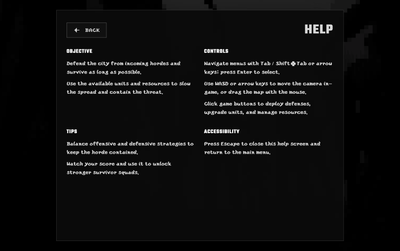
Keyboard Navigation: Play entirely with keyboard - no mouse required
Multiple Camera Modes: Choose viewing angle that works best for you
No Time Pressure: Play at your own pace - pause whenever needed
Perfect For
This game is designed for fans of survival, strategy, simulation, and zombie apocalypse games. It delivers a satisfying combination of tactical decision-making, real-time outbreak defence, and polished indie presentation, making it ideal for players who want intense zombie defence action with strong strategic depth.
Frequently Asked Questions
Can I pause the game?
Yes! You can pause and resume at any time by pressing SPACE or clicking the pause button. Take as long as you need to plan your strategy.
How long does a typical playthrough take?
A single session typically lasts 15-60+ minutes depending on your playstyle and difficulty settings. Some players prefer quick 15-minute challenges, while others engage in extended 2+ hour survival runs.
Is there a tutorial?
Yes. New players start with an interactive tutorial that teaches you how to deploy units, use tools, and read the HUD. You can skip it anytime if you prefer to learn by experimenting.
Will this run on my laptop?
The browser version runs on any modern laptop with 4GB RAM and an updated browser. For best performance, we recommend a dedicated GPU and 8GB RAM. See System Requirements section for full details.
Can I customize difficulty?
Yes. You can adjust zombie spawn rates, unit effectiveness, and challenge modes. You can also enable "Survival Mode" for unlimited zombie pressure, or select timed challenge scenarios.
Does it work on mobile/tablets?
The browser version works on tablets with landscape orientation. Mobile phones can run it but the small screen may make control panels cramped. A dedicated mobile app is planned for future release.
Can I restart a game I'm losing?
Yes. You can restart at any time using the restart button in the HUD. You can also load previous saves (on desktop version) to try different strategies.
Is there a sandbox/creative mode?
Yes. In Custom Scenarios, you can spawn unlimited units and toggle zombie threats on/off to experiment with strategies without survival pressure.
How often do you update the game?
We release updates monthly with new features, balance adjustments, and community feedback. Check our Changelog or follow us on social media for latest updates.
Will this game run offline?
The desktop versions (Windows, macOS, Linux) run fully offline. The browser version requires internet connection to load, but no internet required during play.
Are there graphics settings?
Yes. You can adjust particle effects, zombie detail level, and camera smoothing in the settings menu to optimize performance on your device.
Can I play with a controller?
Currently keyboard and mouse are primary controls. Controller support is on our roadmap for future updates.
Community & Support
Join Our Community
Discord Server: https://dc.gg/devvyyxyz - Chat with developers and players, share strategies, get help
Twitter/X: @devvyyxyz - Follow for updates, polls, and announcements
Reddit: r/devvyyxyz - Discussion and strategy sharing
Report Issues & Feedback
Bug Reports: GitHub Issues or email support@[yourdomain].com
Feature Requests: Post in our Discord or email with your ideas
General Feedback: All feedback helps us improve - we read everything!
Response Time: We typically respond to reports within 24-48 hours
Developer
Humans vs Hordes: Simulator is developed by [YOUR_NAME/TEAM]. We're passionate about strategy games and zombie simulations. This is a passion project built to modernize the outbreak simulator genre while maintaining deep tactical gameplay.
Follow our development and stay updated on new features:
Monthly development blogs at [YOUR_BLOG]
Early access to new features via Discord
Community voting on upcoming features
Ready to take command? Download Humans vs Hordes: Simulator today and lead humanity to survival.


Mild Cartoon Violence
Mild Fantasy Violence
Mild Realistic Violence
Animated Bloodshed
Drug Reference
Comical Shenanigans
Simulated Gambling