


Comments

SERV: installer
SERV: Portable
Source Engine Resources Viewer — SERV
Source Engine Resources Viewer, usually shortened to SERV, is a fan-made Windows tool suite for viewing, inspecting, browsing, and launching different kinds of Source Engine resource files.
SERV is made for people who like working with, studying, organizing, testing, or exploring files from Source Engine games and Source-based projects.
Instead of being one giant program, SERV is built as a collection of smaller tools connected through one main Hub. Each viewer or inspector is its own standalone program, while the SERV Hub organizes everything in one place.
SERV is a fan-made utility suite. It is not affiliated with Valve, Steam, or any official Source Engine development team.
Current Public Build
Current public build: SERV Beta 2
Release type: Beta / public test release
Platform: Windows
Build direction: Native C++ / Qt recode
Developer: sonic Fan Tech
SERV Beta 2 is a major rewrite of the older Python-based SERV tool suite. The new version uses native C++ applications, Qt-based interfaces, and dedicated DLL backends for many of the tools.
This release is meant to be the new foundation for SERV going forward.
Some tools are already working well, while others are still experimental or early. SERV Beta 2 is usable, but it is still a beta, so some features may change, improve, or be replaced in future versions.
LINKS
Installer Version
Use this if you want SERV installed like a normal Windows program.
SERV Beta 2 Setup:
Portable Version
Use this if you want to extract SERV into a folder and run it without installing.
SERV Beta 2 Portable:
https://github.com/sonicFanTech/SourceEngineResourcesViewer/releases/download/B2/SERV_PB2.7z
EULA
https://github.com/sonicFanTech/SourceEngineResourcesViewer/blob/main/LICENSE.md
Website
https://sonicfantech.org/Site/SERV/index.html##
GitHub Page
https://github.com/sonicFanTech/SourceEngineResourcesViewer
What is SERV?
SERV is a collection of Source Engine resource utilities.
It can be used to inspect, browse, preview, or organize many kinds of files used by Source Engine games.
SERV can be useful for:
- Source Engine fans
- Modders
- Map makers
- Tool developers
- Archive explorers
- Fan-game developers
- People studying how Source Engine games store assets
- People who want one organized place for Source resource tools
SERV can help with things like:
- Browsing Source Engine archives
- Inspecting map, model, texture, material, script, sound, scene, and resource files
- Viewing metadata from Source Engine formats
- Previewing supported assets
- Extracting readable references from files
- Building Source game launch options
- Playing or inspecting Source demo files
- Organizing Source Engine research and development utilities
Why SERV Exists
Source Engine games use many different file formats.
Some are text-based and easy to read. Others are binary, split across multiple files, or hard to inspect without special tools.
SERV exists to make that easier.
Instead of needing a different random tool for every format, SERV tries to bring multiple Source Engine resource tools together under one organized suite.
The goal is not to replace official Valve tools. SERV is a fan-made utility suite meant for learning, inspecting, experimenting, and making Source Engine file exploration more convenient.
SERV Beta 2 / C++ Recode
SERV Beta 2 is not just a small update. It is a large recode of SERV into native C++ tools.
The older Python version helped prove the idea of SERV, but the new C++ version is meant to be:
- Faster
- Cleaner
- More stable
- Easier to expand
- Easier to maintain
- Better organized
- More native-feeling on Windows
Main Beta 2 Goals
- Rebuild the SERV Hub in C++
- Rebuild most old Python tools as C++ tools
- Use a cleaner Tools folder layout
- Use metadata files so the Hub can detect tools automatically
- Move format-specific logic into DLLs
- Keep the tool EXEs focused mostly on UI
- Make each tool easier to update without breaking the rest of SERV
- Improve long-term performance and maintainability
What Changed Compared to the Old Python Version
- The Hub is now a native C++ / Qt application
- Tools are now native C++ / Qt applications
- Many tools have their own custom management DLLs
- Tool detection is handled through tool.servtool.json
- The folder structure is cleaner
- Tools are grouped into Viewers, Inspectors, and Other utilities
- Most old tools have been remade
- Some tools are still early prototypes and will continue improving over time
Tool Suite Overview
SERV Beta 2 currently includes multiple tools for different Source Engine file types.
Tool Suite Overview:
SERV Hub - Hub - Working - Launches and organizes all SERV tools
VPK Browser - Viewer - Working - Opens and browses Valve VPK archive files
VTF Viewer - Viewer - Working - Opens and previews Valve Texture Format files
VMT Viewer - Viewer / Inspector - Working - Opens and parses Valve material files
Source BSP Explorer - Viewer - Working / Beta - Views and inspects Source BSP map files
MDL Viewer / Inspector - Viewer / Inspector - Experimental - Inspects and previews Source model files
VMF Viewer / Inspector - Viewer / Inspector - Working - Opens and inspects Hammer VMF map source files
NUT Viewer / Inspector - Inspector - Working - Opens and inspects Squirrel script files
VCD Viewer / Inspector - Inspector - Working - Opens and inspects Source choreography scene files
PCF Inspector - Inspector - Working / Early - Inspects particle system files
SND Inspector - Inspector - Working - Inspects sound scripts and audio metadata
RES Inspector - Inspector - Working - Inspects Source resource/reference files
SAV Inspector - Inspector - Working - Inspects save/binary files and readable strings
Launch Options Builder - Utility - Working - Builds Source/Steam launch command options
DEMO Player / Inspector - Inspector / Player shell - Working / Experimental - Inspects and launches demo playback
SERV Hub
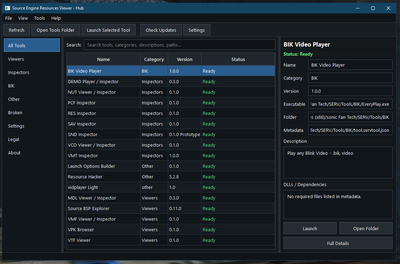
The SERV Hub is the main launcher and management program for SERV.
It scans the Tools folder, reads tool metadata files, checks dependencies, displays tool status, and launches selected tools.
The Hub itself does not try to parse every Source file format. Instead, it launches the correct tool for the job.
Hub Features
- Native C++ / Qt interface
- Tool list with categories
- Tool metadata support
- Tool status checking
- Missing dependency warnings
- Search/filtering
- Open selected tool folder
- Launch selected tool
- About and legal sections
- Hidden/internal tool support
- Broken-tool detection
- Clean multi-tool folder layout
Tools are usually organized into categories like:
- Viewers
- Inspectors
- Other
- Broken
- Hidden/Internal
Included Tools
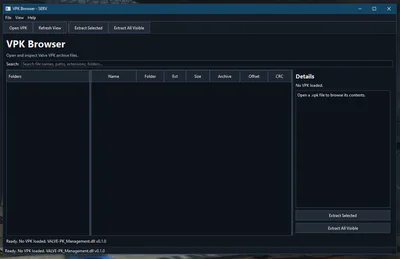
VPK Browser
The VPK Browser is used to open and inspect Valve VPK archives.
VPK archives are commonly used by Source Engine games to store materials, models, sounds, scripts, maps, particles, scenes, and other game content.
Features
- Opens .vpk files
- Supports _dir.vpk style archive sets
- Displays folder and file structure
- Shows file metadata where possible
- Supports searching/filtering
- Supports extracting selected files
- Supports extracting visible/filtered files
- Helps locate materials, textures, models, scripts, sounds, and maps
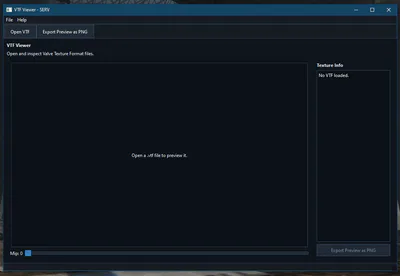
VTF Viewer
The VTF Viewer opens and previews Valve Texture Format files.
VTF files are Source Engine texture files. They are often referenced by VMT material files.
Features
- Opens .vtf files
- Reads VTF header information
- Shows texture dimensions
- Shows version information
- Shows mipmap count
- Shows texture format
- Displays supported texture previews
- Allows mipmap selection
- Exports the current preview as PNG
Prototype support includes common formats such as:
- DXT1
- DXT3
- DXT5
- RGBA8888
- ABGR8888
- ARGB8888
- BGRA8888
- RGB888
- BGR888
- I8
- A8
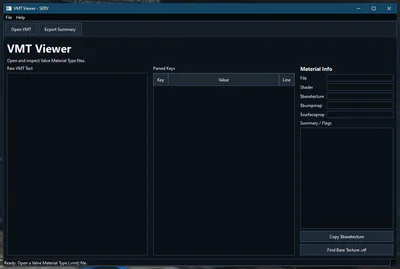
VMT Viewer
The VMT Viewer opens Valve Material Type files.
VMT files describe how Source Engine textures and materials should behave. They often point to VTF textures through keys like $basetexture.
Features
- Opens .vmt files
- Shows raw VMT text
- Parses shader name
- Parses material key/value pairs
- Detects common material keys
- Shows material details
- Detects $basetexture
- Detects $bumpmap
- Detects $surfaceprop
- Detects $envmap
- Detects transparency-related settings
- Attempts to find matching VTF files
- Exports a material summary
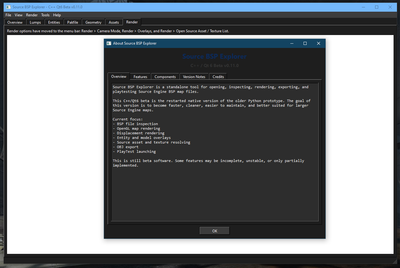
Source BSP Explorer
Source BSP Explorer is used to open, inspect, and view Source Engine BSP map files.
BSP files are compiled map files used by Source Engine games.
Features
- Opens .bsp files
- Views map information
- Inspects lumps
- Inspects entities
- Inspects textures/materials
- Views map geometry
- Helps test or launch maps in Source games
- Exports or analyzes map resources
SBSPE is one of the larger SERV tools and may have more complex dependencies than smaller inspectors.
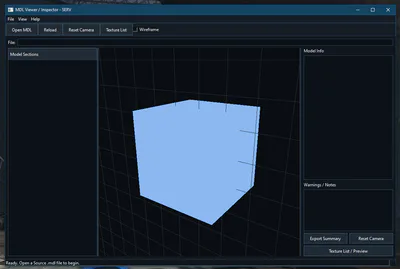
MDL Viewer / Inspector
The MDL Viewer / Inspector opens Source Engine model files.
Source models are more complex than many other Source formats because the visible model data is often split across multiple companion files.
A typical Source model may use:
model.mdl
model.vvd
model.dx90.vtx
model.dx80.vtx
model.sw.vtx
model.phy
Features
- Opens .mdl files
- Reads MDL header information
- Detects companion files
- Shows model name
- Shows version
- Shows checksum
- Shows counts such as bones, textures, body parts, hitboxes, and sequences
- Provides an OpenGL preview panel
- Attempts real mesh loading from VVD and VTX files
- Falls back to a bounds/cube preview when full mesh loading fails
- Includes a texture/material browser window
- Exports a model summary
Experimental Areas
The following areas are still experimental:
- Full Source model mesh assembly
- Correct VTX strip handling
- Texture resolving
- VMT/VTF loading for models
- Material preview
- Accurate rendering across all Source branches
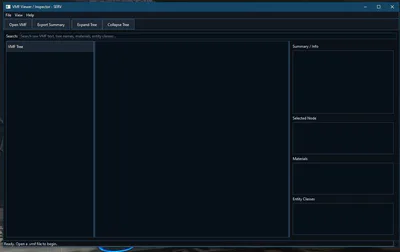
VMF Viewer / Inspector
The VMF Viewer / Inspector opens Hammer VMF map source files.
VMF files are text-based map source files used by Valve Hammer Editor.
Features
- Opens .vmf files
- Shows raw VMF text
- Parses VMF block structure
- Shows VMF tree view
- Shows selected node properties
- Counts entities
- Counts solids
- Counts sides
- Counts materials
- Counts visgroups, cameras, and cordons
- Lists material references
- Lists entity classes
- Supports text search
- Exports a VMF summary
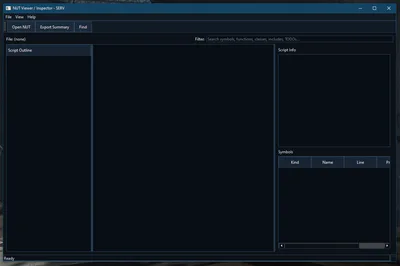
NUT Viewer / Inspector
The NUT Viewer / Inspector opens Squirrel .nut script files.
Some Source and Source-based games use Squirrel scripts for gameplay logic, scripted events, tools, or game-specific behavior.
Features
- Opens .nut files
- Shows raw script text
- Provides simple syntax highlighting
- Extracts function names
- Extracts class names
- Extracts include/require-like references
- Detects TODO/FIXME/HACK comments
- Shows script statistics
- Shows a symbol tree
- Shows a symbol table
- Allows jumping near symbol lines
- Exports a script summary
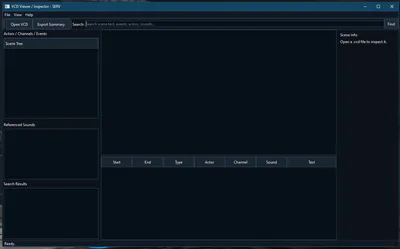
VCD Viewer / Inspector
The VCD Viewer / Inspector opens Source choreography scene files.
VCD files are used by Source Engine games for scenes, dialogue, gestures, facial animation timing, actor events, and choreography data.
Features
- Opens .vcd files
- Shows raw VCD scene text
- Parses actors
- Parses channels
- Parses events
- Parses timing values where possible
- Extracts referenced sounds
- Extracts scene text/caption-like strings where possible
- Shows a scene tree
- Shows an event table
- Shows a referenced sounds list
- Supports searching
- Exports a scene summary
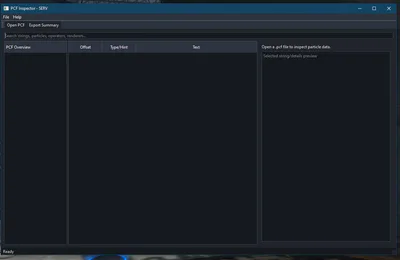
PCF Inspector
The PCF Inspector inspects Source particle system files.
PCF files are often binary particle files, commonly used for effects like smoke, sparks, explosions, glows, portals, energy effects, and other visual effects.
Features
- Opens .pcf files
- Extracts readable strings
- Detects possible particle system names
- Detects possible operators
- Detects possible renderers
- Detects material and texture-related strings
- Shows string offsets
- Shows type hints
- Supports search/filtering
- Exports a PCF summary
Full PCF parsing may require deeper binary DMX-style parsing. Prototype support currently focuses on useful inspection and string extraction.
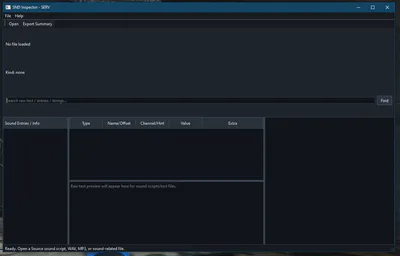
SND Inspector
The SND Inspector inspects Source sound script files and some audio files.
Source sound scripts define sound names and properties used by games.
Features
- Opens Source sound script files
- Parses sound entries
- Shows channel
- Shows sound level
- Shows volume
- Shows pitch
- Shows wave references
- Opens WAV files and reads RIFF/WAVE metadata
- Performs basic MP3/ID3 detection
- Extracts readable strings from binary files
- Supports raw text search
- Exports a sound summary
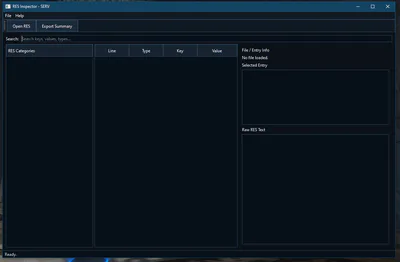
RES Inspector
The RES Inspector opens Source resource/reference files.
RES files can contain references to materials, sounds, models, scenes, scripts, and other files.
Features
- Opens .res files
- Shows raw RES text
- Extracts quoted key/value pairs
- Guesses reference types
- Groups references by category
- Supports search/filtering
- Shows selected entry details
- Exports a summary
Reference categories may include:
- Material
- Texture
- Model
- Sound
- Scene
- Particle
- Script
- UI Resource
- Other
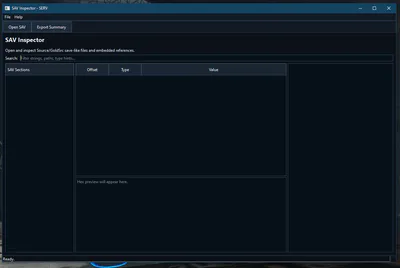
SAV Inspector
The SAV Inspector opens save files and unknown binary files for inspection.
Different games use different save formats, so this tool focuses on metadata, readable strings, references, and hex preview rather than full game-specific decoding.
Features
- Opens .sav, .dat, .bin, and unknown binary files
- Shows file/header metadata
- Detects save-like headers where possible
- Extracts readable ASCII strings
- Detects probable embedded paths/references
- Shows reference type guesses
- Shows hex preview
- Supports string search/filtering
- Exports a summary
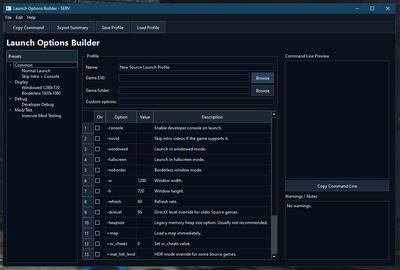
Launch Options Builder
The Launch Options Builder helps create Source and Steam launch option strings.
It is useful for testing mods, launching games with custom settings, debugging, changing display modes, or building reproducible launch commands.
Features
- Builds Source/Steam launch option strings
- Provides common presets
- Supports display/window mode options
- Supports developer/debug options
- Supports insecure/mod testing options
- Allows selecting a game EXE
- Allows selecting a game folder
- Allows enabling/disabling options in a table
- Allows editing option values
- Allows adding custom launch options
- Shows a live command-line preview
- Copies command line to clipboard
- Exports a launch summary
- Includes basic profile save/load placeholder
- Shows warnings for conflicting, legacy, or risky options
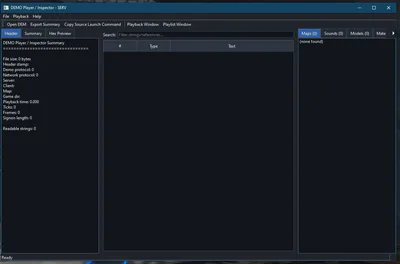
DEMO Player / Inspector
The DEMO Player / Inspector opens Source demo files and can help launch demo playback in a Source game.
Source demo files usually use the .dem extension.
Inspector Features
- Opens .dem files
- Reads Source demo header fields where possible
- Shows map name
- Shows game directory
- Shows server name
- Shows client name
- Shows demo protocol
- Shows network protocol
- Shows tick count
- Shows frame count
- Shows playback time
- Shows signon length
- Extracts readable strings from binary demo data
- Guesses referenced maps, sounds, models, materials/textures, and console/CVar strings
- Shows a hex preview
- Exports a summary
Playback Features
- Select Source game EXE
- Select working directory
- Select game/mod folder
- Add extra launch arguments
- Toggle common launch options
- Build a +playdemo command
- Copy launch command
- Play selected demo
- Manage demo playlists in a separate window
- Save/load playlist files
Demo playback depends on the game and Source branch.
Some Source games do not like absolute paths passed to playdemo. The DEMO tool may copy the selected demo to the game/mod folder and launch playback by demo name instead.
Common Things You Can Do With SERV
Browse a Game Archive and Open a Texture
1. Open SERV Hub.
2. Launch VPK Browser.
3. Open a game _dir.vpk.
4. Search for a .vtf file.
5. Extract the .vtf.
6. Launch VTF Viewer.
7. Open the extracted texture.
8. Export a PNG if needed.
Inspect a Material
1. Launch VMT Viewer.
2. Open a .vmt file.
3. Check the shader name.
4. Check $basetexture.
5. Use VTF Viewer to inspect the matching texture.
Inspect a Model
1. Launch MDL Viewer / Inspector.
2. Open a .mdl file.
3. Make sure matching .vvd, .vtx, and .phy files are nearby.
4. Check model counts and companion file status.
5. Use the preview panel.
6. Open the texture/material browser if needed.
Inspect a Map Source File
1. Launch VMF Viewer / Inspector.
2. Open a .vmf file.
3. Browse the tree.
4. Check entity classes.
5. Check material references.
6. Export a summary if needed.
Build Source Launch Options
1. Launch Launch Options Builder.
2. Select the game EXE.
3. Select the game folder.
4. Enable desired options.
5. Add custom options if needed.
6. Copy the generated command.
Play a Demo
1. Launch DEMO Player / Inspector.
2. Open a .dem file.
3. Open the Playback window.
4. Select the correct game EXE.
5. Select the correct working directory and game/mod folder.
6. Click play.
7. Check the Source console if playback does not begin.
Important Beta Notes
SERV Beta 2 is working, but it is still a beta.
Some tools are more complete than others. Some tools are currently inspectors rather than full viewers. Some advanced features, like full Source model rendering or demo playback handling, may still need more work.
Known Beta 2 notes:
- MDL Viewer / Inspector can inspect models and attempt real mesh rendering, but full Source model rendering and texture resolving are still experimental.
- DEMO Player / Inspector can inspect demos and launch a Source game with playdemo, but playback behavior depends on the game, demo location, and Source branch.
- PCF Inspector currently focuses on extracting readable particle-related strings and references. Full binary PCF/DMX parsing is planned for later.
- SAV Inspector is a general binary/save inspector and may not fully decode every game’s save format.
- SWATCH Inspector and EXE/DLL Inspector are not remade in C++ yet.
Troubleshooting
The Hub Does Not Show a Tool
Check that the tool folder contains:
tool.servtool.json
Also check that:
- The JSON file is valid
- There is no trailing comma
- The executable value matches the EXE name
- The category is correct
- hidden is not set to true
- The file is inside a scanned Tools folder
A Tool Says a DLL Is Missing
Make sure the required DLLs listed in tool.servtool.json are next to the tool EXE.
Example:
VTFViewer.exe
VALVETEXManagement.dll
A Qt Tool Does Not Open
Make sure the Qt runtime files are present.
Common required files include:
Qt6Core.dll
Qt6Gui.dll
Qt6Widgets.dll
platforms/qwindows.dll
OpenGL-based tools may also need:
Qt6OpenGL.dll
Qt6OpenGLWidgets.dll
MDL Model Opens But Only Shows a Box
That means the MDL header loaded, but the full mesh could not be assembled.
Check for companion files:
.mdl
.vvd
.dx90.vtx
.phy
The MDL renderer is still experimental.
MDL Model Has No Textures
Make sure the related material and texture files are available.
Typical layout:
materials/models/.../texture.vmt
materials/models/.../texture.vtf
Texture resolving is still experimental and may not work for every model yet.
DEM File Opens But Playback Does Not Start
Try:
- Selecting the correct game EXE
- Selecting the correct game folder
- Selecting the correct -game folder
- Copying the demo into the game folder
- Running playdemo demoname manually in the game console
- Checking if the demo was recorded in the same game and game version
Remaining Tools Not Yet Remade
Most of the old SERV tool list has now been remade in C++.
The remaining tools not yet remade are:
SWATCH Inspector
EXE/DLL Inspector
These may be added in a future SERV update.
Future Plans
Future SERV updates may focus on:
- Improving MDL mesh rendering
- Improving MDL texture resolving
- Improving DEM playback and playlist behavior
- Adding SWATCH Inspector
- Adding EXE/DLL Inspector
- Improving VPK extraction workflows
- Improving Hub tool icons and dependency checking
- Reducing warnings and improving DLL interfaces
- Adding more documentation and examples
- Improving installer and portable deployment
- Expanding SERV into a larger Source Engine resource suite
Legal / Third-Party Notes
SERV is a fan-made tool suite.
SERV is not affiliated with Valve, Steam, or any official Source Engine development team.
Some included or optional third-party tools may have their own licenses, permissions, or redistribution notes. Check the included legal files and any third-party documentation for details.
Valve, Source, Steam, Half-Life, Portal, Team Fortress, Counter-Strike, and related names are property of their respective owners.
Closed Source Notice
SERV is a closed-source project.
The public release page is for downloads, documentation, release notes, and issue tracking where applicable.
Source code, build instructions, and compile instructions are intentionally not included.
Project Status
SERV Beta 2 is a major milestone for the project.
It is now a native C++ / Qt tool suite with a rewritten Hub and many remade tools. Some tools are still prototype-level, but the suite is functional and ready for wider beta testing.
SERV is still being improved, but Beta 2 is the first version that really represents the new direction of the project.
Credits
Developed by sonic Fan Tech.
SERV exists because Source Engine files are interesting, useful, and fun to explore.
Short Description
A fan-made Windows tool suite for viewing, inspecting, browsing, and launching Source Engine resource files.
Suggested Game Jolt Tags
#SourceEngine, #ModdingTool, #Valve, #VPK, #VTF, #VMT, #BSP, #MDL, #GameDevelopment, @WindowsTool, #FanTool, #Utility