
I made a really pretty new water shader with Shader Forge. Check it out, it refracts the land beneath near the shore and the animated waves look much better!
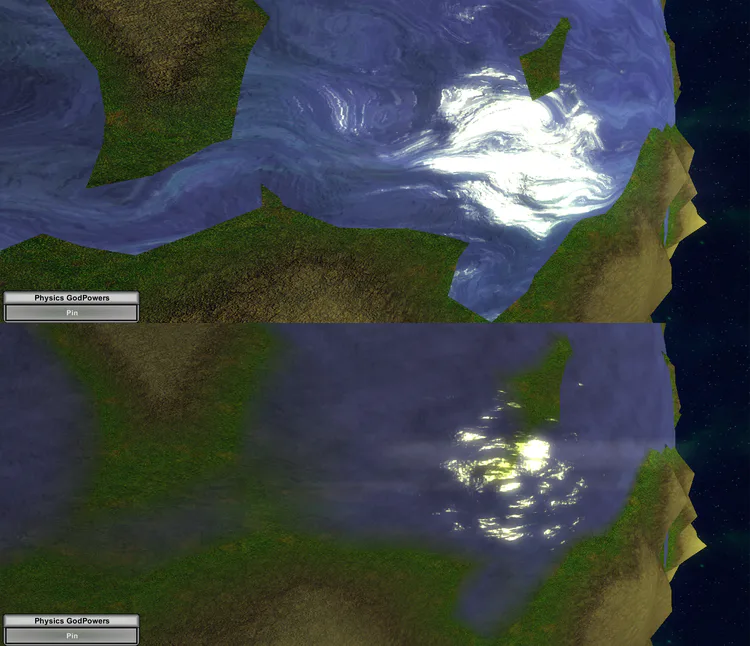
More importantly, I made the game faster. How much faster? The physics alone runs between 1.5x to 17x faster. Yes, you can throw far more objects into a scene at a time and still run it faster.
I remembered that the force of gravity equal on both objects, I changed the gravity script so that only the larger object calculates the gravitational force, and adds the negative to itself. If their mass is equal, it picks the one with a bigger ID to calculate and apply gravity. That way only one object ever has to calculate the gravitational force, effectively cutting the gravity computation in half.
I set up a stress test with spheres evenly placed on the outer faces of a cube to see what sort of performance savings I got. I kept an eye on the frame rate during the simulation, but waited till they all crashed at the end for the data.
218 Standard Spheres:
Every object calculates: 1650ms
Larger ID only: 1450ms
Larger mass only: 1250ms
Larger mass & larger ID: 1150ms
Total savings between original and new script: 36% less time per frame!
This is good, but it’s still very laggy because of the sheer number packed into such a small area. Next I did a more reasonable test with just under 100, which would still be a very busy scene in-game to have all these objects so densely packed. However, I was quite surprised:
98 Spheres:
Every object: 260ms
Larger ID only: 100ms
Larger mass only: 25ms
Larger mass & larger ID: 20ms
With the new improvements, there was a 94% decrease in CPU processing time. This is the difference between a very laggy 5 fps with the original and the just over 60fps with the new script running nearly 100 objects simultaneously colliding and applying gravity to each other. The result of the simulation is completely unchanged, as the physics remains exactly the same, if not improved (larger objects already had to calculate how much they were pulling on other objects, now they’ll also be acted upon by all those objects for essentially free in addition to the cost savings.
I feel dumb for not having noticed this sooner, but hey, at least it’s implemented now. I’ll be going over my other scripts over the next couple days to see what else I can optimize.



















7 comments