
The message hub script itself looks a lot more complicated than it actually is. I'll explain how it works:
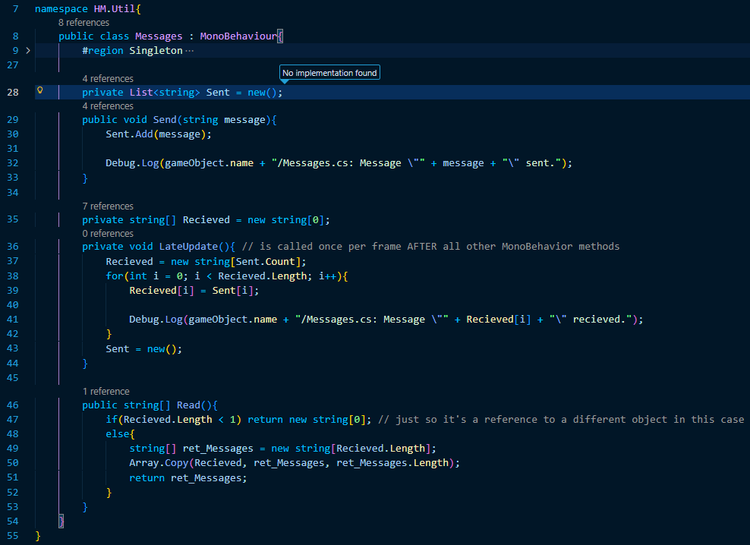
To put it to words, any script can send a message to the message hub by calling Messages.Send to be saved for the remainder of the frame in a C# List. All a List is, by the way, is a script in the C# standard library that enhances arrays by allowing you to add/remove items from an array during runtime, they're useful in cases where you do not know how big an array will need to be.
Since Lists are typically a lot larger than an array of their count (among a few other reasons I made this decision) rather than having the list be the primary source from which messages are read, at the end of the frame, all messages stored in the list are copied to an array of "recieved" messages that may be read during the next frame update via the value returned by Messages. Read (sorry for the space, Game Jolt was auto-link-ifying that for some reason) and the list is deleted and a brand new one created for the next frame.
This is a lot better for my quest system than what I had before because now, rather than messages being sent directly to the quest manager (which I disliked as it creates a dependency between potentially many scripts and the quest manager), any script can just send messages into the wind and that information may or may not be utilized by other scripts. The only weakness this system has is other scripts aren't technically reading messages sent during the same frame but the ones sent during the PREVIOUS frame (because the list is copied over in the LateUpdate method). Granted, for the purposes of the quest manager, this doesn't particularly matter.
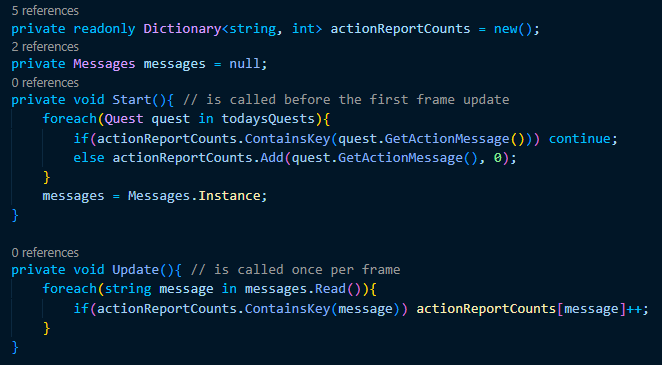
The quest manager itself is relatively unchanged, I simply replaced the ReportAction method with the code shown in the screenshot above. On Start we create a dictionary mapping whatever messages are relavent to todays quests to integers in order to keep track locally of how many times a quest-relevant message has been recieved by the message hub, this information is updated once per frame.
This is a much cleaner way to handle the quest event reporting than the previous approach because now, rather than every enemy script sending messages directly to the quest manager, whenever a soldier enemy is defeated, a message reading "defeated_soldier" is sent to the message hub and it, of course, matters not to the message hub whether this information is utlized because it does it's thing either way.
Whenever there IS a quest manager in the scene, this message will, of course, mean something as the quest manager will read the messages from the message hub and use this information for it's purposes. Say the user has a quest to defeat a certain number of soldiers, then this message will be checked by the quest manager and the value paired to it there is incremented every time the message is found in the array returned by Messages. Read.













0 comments