

Loading...
16
Game
Hensen Hopper
1 year ago

I don't know how well you can see it in this video, but I've coded a dashing mechanic for Hensen Hopper! I plan to have dashing consume a "dash charge," a kind of ammo you can get as you play in the form of enemy drops.


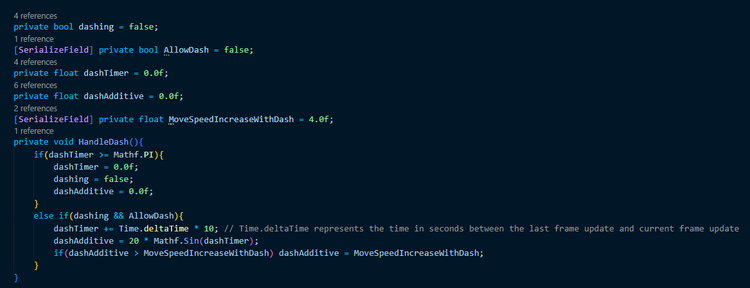
The way I've written this actually makes use of the sine function! Whenever the player presses shift (keyboard) or X (x-box controller), a timer counting at 10x real-time is started and Hensen's movement speed is increased with respect to the sine of the timer's value. The timer ends at Pi seconds.
code_kz9bgdkieq.png

I chose to do it this way because using the sine function as a multiplier for the increase in movement speed has the effect of blending the dash in smoothly so long as my timer starts at 0 and is stopped at Pi (because sine 0 and sine Pi both equal 0 and sine anything between those two values is a positive number <= 1). In order to modify the duration of the dash or the speed of the dash, I can simply multiply Time.deltaTime when incrementing the timer or multiply the Mathf.Sin() call respectively.

I then capped the movement speed increase to a value I can modify from the inspector which has the effect of making it so increasing the multiplier on the Sin call beyond that speed increase cap, rather than increasing the movement speed increase during the dash, increases what you could call the abruptness of the dash.

Much like everything else in my PlayerController script, the dash is triggered in the Update method based on the player's input read from the InputManager and the HandleDash method only modifies values related to Hensen's movement, which are used in FixedUpdate where the actual movement of the character in the scene is performed.
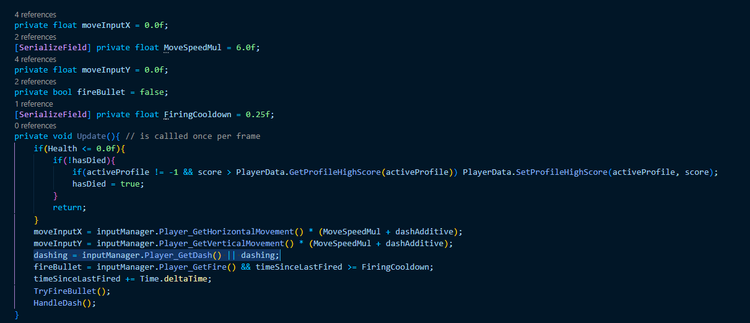
code_ymwwk7nnyn.png

One thing I'm thinking about adding to this is actual variables for the dash duration and dash abruptness (aka the multiplier on the Sin call) that I can modify from the inspector. The dash abruptness is fine, I'd just need to do a bit of planning for dash duration. I know there is a way to normalize the duration into seconds, I just need to work out algebraically what the formula is for this and then implement that into my code. I also plan on adding some effects for the dash to make it easier to tell when you're dashing which is an entire other task.

Thanks for reading!



0 comments

Loading...

Next up

I made some updates to the hints system! Now it reads from the message hub to determine when to show hints and the hint texts now come from the lang system I wrote yesterday. This simplified my the hints handling algorithm A LOT from what it used to be!

I wrote a modular language system! I can now add new entries with definitions in as many languages as I please and all from the inspector window in the Unity editor! This allows me to potentially have Hensen Hopper translated to other languages easily!

I've decided to have the statistics behind the quests in Hensen Hopper be handled as actions reported to the quest manager rather than try to write variables into a whole bunch of scripts solely for quests.

Doki Doki Literature Club is celebrating Monika's birthday and the 8th anniversary of DDLC with exclusive stickers, avatar frames and backgrounds on Game Jolt! 

Head over to the shop to collect yours 👉 https://gamejolt.com/#shop

Oh yeah, also, I updated that algorithm for dash handling I shared yesterday so I can set the dash duration via the inspector window!

Mae Borowski is the main character of Night in the Woods! It's an adventure game that tells the story of her return to her hometown of Possum Springs. She was confirmed as canonically pan in a social media post by the game's creator Scott Benson.

I am impressed by my past self right now. The algorithm behind the unimplemented dashing mechanic (that I wrote like a year ago) uses a sine wave to smoothly increase/decrease Hensen's movement speed for a dash. That is so clever! I actually wrote this!?

The beetle shell is now fully VISUALLY implemented! Next thing on my list is a unique sound for Hensen equipping it.

The Knightling launches on August 28! Wishlist it now so you don't miss out: https://bit.ly/KnightlingSteam

To celebrate the game's impending release, we've added The Knightling Pack and The Knightling Community Pack back to the Shop!

Okay, so I've gotten the functionality for the beetle shell render over the player working! (using the first 3 frames from the beetle shell collect animation as placeholder sprites, these ARE NOT the final sprites)