
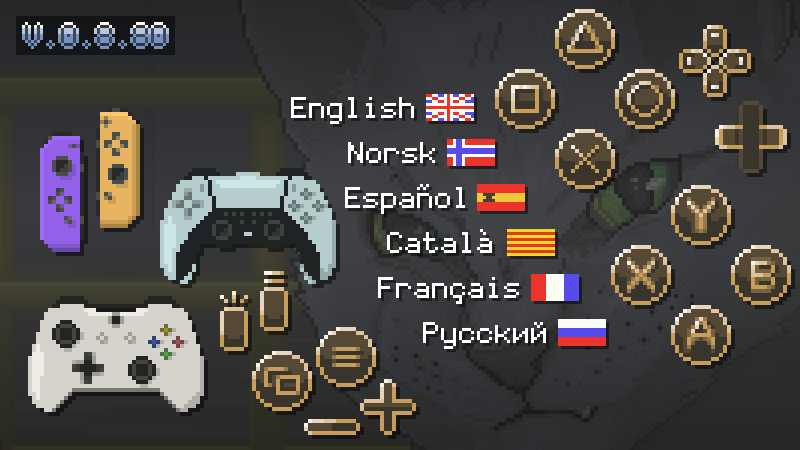
Update v0.8.80 is finally live! This is a big one, introducing Localization and a completely overhauled Controller-system! This update took quite some time to develop – a lot more time than anticipated, as I had to go through all text-elements in the game and fundamentally change them, to set up a framework for multiple languages. Now that the framework is in place, it will be significantly faster to add new languages in the future.
LOCALIZATION
Translations have been broken down into three portions: UI, Dialogue, and Descriptions. The purpose of this update has been to build the fundamental framework for switching between languages, and retrofit all UI-elements to be able to switch between languages displayed according to an index. This has been a slow and tedious process, as I never had localization in mind from the start, while programming my game. Now that the system is in place, adding new languages will be significantly faster. Another factor for this taking so long, is that most of these UI-elements are rasterized and have been delicately intertwined with respective glyphs;
X,Circle, Square,Triangle, L2 & R2 for Dualsense (PS5/4)
A, B, X, Y, LT & RT for XBox Gamepad
B, A, Y, X, ZL & ZR for Joy-Cons/Nintendo-controller
To allow for these variations across six languages (and counting), I’ve set up an array-data structure. The game can now be played in:
English
Norwegian
Spanish
Catalan
French
Russian
Chinese & Japanese are confirmed to be added in the future.
NOTE: Dialogue has still not been translated (with few exceptions). This is left for last, when the script has been error-proofed and completely finalized, so I won't have to painstakingly update every language and ask my translators to look at the same scripts again, if I make edits.
VERSATILE GAMEPAD COMPATABILITY
And now for the controllers – In the last update, the XBox Gamepad was the only supported controller outside of mouse/keyboard. Now, the underlying system has been completely overhauled, utilizing the API; Simple DirectMedia Layer (SDL). This allows any inputs to be read and interpreted from almost any controller-device you plug into the computer. The new system will read your device, and display the appropriate glyphs and button mapping accordingly. I’ve also made seamless transitions a priority, so the game will update its glyphs/mapping in real-time, if you press the mouse/keyboard-key and a controller button/joystick interchangeably. After doing some QA and extensive playtesting, I can confidently recommend the PS5 Dualsense-controller as the Developer’s choice.
The R1/Right Bumper is vacant right now, so I am open to suggestions on what action to map to this button.
QUALITY-OF-LIFE / MORE ADDITIONS
The Options Menu has been upgraded to have tabs divided into Settings/Language/Hardware. Some contextual prompt-texts have been replaced with more aesthetic icons. The Mission Objectives-tab has received a facelift. You can now assign any unlocked gun as an “AIRDROP”, so you can retrieve it during the mission at landing zones. The Laser Kit-item served no significant purpose besides vanity, so it’s been repurposed into the new Upgrade Kit-item. Apply it to your current gun to increase the firerate. A new Ammo Overview UI-element has been added; displaying all ammunition carried, not limited to the guns you're carrying – and can be viewed by accessing inventory.
The Recon Drone has received some love;
Fixed the annoying bug that caused it to get stuck or bounce unpredictably.
The Battery Bar drains by the pixel instead of cells to give you a clearer indication of how much power you have left.
The movement has been made buttery smooth with joystick-inputs.
V0.8.80 Changelog:
Cleaned up some outdated & unused assets to reduce file size bloat
Asset production
Base tileset, M8
Improved assets, M1
Made UI-layer initialize fully transparent on Mission Start
Optimized code
Merged duplicated objects
Pause Menu-buttons
Start Screen-buttons
Game Over-buttons
Centralized code handling Layers
Utilized Signum-function where done manually
Replaced bloated/redundant code related to switching between primary & secondary weapon
Character animations, new index
New Ammo Overview UI-element
Displays every ammy type carried by player
Access inventory to show
Enhanced Start Screen
Removed external scene for Options Screen
A tab for showing Save Data-information (Temporarily disabled)
Localization
UI-elements updated to accommodate multiple languages
Added an internal Language Index
Made all text and UI-elements adjust to index in real-time
Created Font “Artisan’s Crux” (Customized “Coder’s Crux”) for supporting latin accents (Spanish, Catalan, French, etc.)
Embedded Font “Monogram” for Russian localization
Upgraded Options-Screen
Tabs
Sorted options into three tabs: Settings/Language/Hardware
New SFX’s
Ground impact, Supply Drop
Open Supply Drop-crate
Equip/Ready for Shotgun
Equip/Ready for LMG
New feature; Assign gun at Weapon Selection-screen for Airdrop
Added health bar for Enemy Tank Unit
Aesthetic improvements to Ordnance Selection, Weapon Selection-screen
Controller/Gamepad Input complete overhaul
New glyphs for multiple input devices
Utilizing Simple DirectMedia Layer API, SDL Object by DarkWire Software
Compatibility with almost any device connected to computer, wired & bluetooth
Tailored compatibility with DualSense (PS5), XBox Gamepad, & Nintendo Joy-Cons
Seamless input device change
Gamepad/Keyboard Icon displaying device used
Keyboard/Mouse
PS5 DualSense
XBox Gamepad
Nintendo Joy-Cons
Index for input glyphs
Improved Map Screen
Drag-n-Drop mouse movement
Map Legend in a collapsible UI-window
VFX; pulsating arrow for Guidance UI
Changed tileset-drawing order (Tested in Crew Quarters, M1)
M1: Added ventilation shortcut; Data Terminal-room to Foyer, second floor
M1: Small level design improvements, aesthetic and functional
Updated Tutorial-assets, accommodating localization & new glyphs
VFX; Added tiny shake on Magazine Counter when firing a bullet
Game Over-screen enhancements
Pulsating “Game Over”-sprite
Added “Abort Mission”-option
Enemy Status (“Alert”/”Searching”) accommodated to support localized strings
Repurposed item: Laser Kit for Upgrade Kit
Made Laser more aesthetic
Increases firerate to applied gun
New Item Sprite
Replaced contextual prompt-text with icons:
Drop-down from platform
Change Camera Mode
View Minimap
View Mission Objectives
Drone Improvements
Fixed bug causing drone to bounce in wrong direction and/or get stuck
Removed unnecessary bobbing
Tailored movement for precise/smooth Joystick-input
Fixed bug causing crosshair to “flimmer”
Made drone stun gun able to fire with R2 / right bumper on Gamepad
Mission Selection-screen
Wider space for mission description
Added text shadow to mission Description











2 comments