

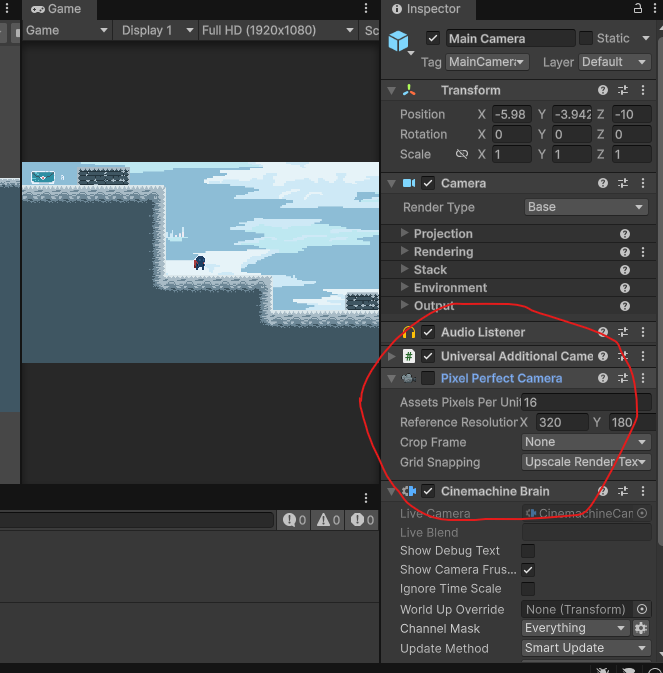
When I decided to use it: I was already deciding which tools I was going to use in the game, regarding the camera, Cinemachine and Pixel Perfect Camera. Then I was testing the game and noticed a shaking whenever I moved the player, so I just thought, "Damn, I messed something up in the movement."
I tried messing with the code, nothing. I changed the gravity thinking there were small jumps, nothing. Desperation set in, changing physics, changing movement, smoothing here, smoothing there, and nothing. Then I thought, "What if it's not physics?" I started looking at the image, my first suspect was CINEMACHINE. I changed the damping a million times, nothing, it only got worse.
Then, I entered the game scene, gave small taps on the movement keys to see if it would shake. That's when I noticed something: whenever it moved, it fit perfectly with the pixels of the scene. Then I thought, what if the movement doesn't allow it to fit with the pixels of the scene? Since it moves 4 pixels per second, it was more obvious. Then I realized it was the "PIXEL PERFECT" that was trying to keep it fitted to the pixel grid, and every time the player moved in the game, it adjusted to the grid every frame, causing intense shaking.
Conclusion: Pixel Perfect fit the sprites perfectly to the pixel grid, but this created shaking because the player's physics didn't do that. A conflict between smoothing and fitting. Solution: disable Pixel Perfect in the game.


















1 comment